Wish You A Very Merry Christmas! — From the team at WAIN

Merry Christmas!
Merry Christmas!
In STEM education, learning rarely follows a straight line. Experiments fail, assumptions are challenged, and results do not always match expectations. Yet these moments of error are often where the most meaningful learning begins.
In physics classrooms especially, abstract concepts such as electrical circuits, polarity, and current flow can be difficult to grasp through theory alone. Hands-on experimentation allows students to see cause and effect directly—but only when the learning process itself is visible, guided, and supported.
This is where interactive display solutions play an increasingly important role.
Traditional classroom experiments often focus on achieving the “correct” outcome. However, in real scientific practice, mistakes are part of discovery. A wire connected to the wrong terminal, an unexpected reaction, or a failed setup all provide opportunities for analysis and understanding.
When students are encouraged to observe what went wrong—and why—it strengthens problem-solving skills, critical thinking, and scientific reasoning. The challenge for educators is making these moments clear, safe, and instructive rather than confusing or discouraging.
Interactive displays help transform experiments from isolated actions into shared learning experiences.
By combining physical experiments with digital visualization, teachers can:
Highlight each step of an experiment in real time
Annotate circuit diagrams and results directly on screen
Pause, review, and correct setups together with students
Compare expected outcomes with actual results
This approach shifts the focus from simply “getting the right answer” to understanding the process behind it.
In a hands-on STEM classroom, the role of display technology extends beyond presentation.
Solutions such as PRIMA Smart Blackboard, used together with UboardMate CC, enable teachers to integrate live experimentation with digital instruction. Physical components—wires, bulbs, batteries, and switches—can be supported by on-screen explanations, annotations, and structured guidance.
When a mistake occurs, it becomes a teaching moment rather than a disruption. Students can clearly see what caused the issue, how it was corrected, and what principle was involved. Over time, this reinforces both conceptual understanding and practical skills.
STEM education often involves real equipment, which introduces both technical and safety considerations. Interactive display systems allow teachers to:
Demonstrate correct setups before hands-on work begins
Guide corrections immediately when issues arise
Reduce repeated trial-and-error risks
Maintain student engagement without unnecessary interruptions
By structuring experimentation through a shared visual platform, classrooms become more controlled, efficient, and effective learning environments.
For schools, system integrators, and education decision-makers, the goal is not to add more technology—but to support better teaching outcomes.
Interactive displays, when applied thoughtfully, help:
Enhance STEM curriculum delivery
Improve classroom interaction and student participation
Support inquiry-based and project-based learning models
Align physical experimentation with digital instruction
Rather than replacing traditional teaching methods, these tools strengthen them.
In STEM education, mastery does not come from avoiding mistakes—it comes from understanding them.
By making experiments visible, interactive, and collaborative, display solutions help turn errors into insights and challenges into learning opportunities. As classrooms continue to evolve, the focus remains the same: supporting educators and students in learning not just what works, but why it works.

In today’s fast-paced digital landscape, a hardware partner is no longer just a vendor in the supply chain—they are a pillar of your brand’s scalability. For businesses looking to deploy high-impact visual solutions, the choice between an OEM and an ODM model can dictate the trajectory of their market success.
Navigating the technical nuances of commercial displays requires more than just assembly.
OEM (Original Equipment Manufacturing): Ideal for those who bring a proprietary vision to life, requiring high-precision execution and strict adherence to unique specifications.
ODM (Original Design Manufacturing): Empowers brands to skip the lengthy R&D cycle by leveraging a manufacturer’s proven expertise, while maintaining deep customization in firmware, software integration, and aesthetics.
To mitigate risks and ensure long-term ROI, project managers and brand owners should evaluate potential partners through three essential lenses:
Engineering Agility: Can the partner solve complex thermal management or PCBA integration challenges? In the world of high-brightness displays and 24/7 operation, innovation must be proactive, not reactive.
Global Compliance & Quality: Beyond basic certifications (CE, FCC, RoHS), a reliable partner ensures that the hardware meets the rigorous endurance standards required for professional environments.
Supply Chain Resilience: In an era of component volatility, a manufacturer’s vertical integration and raw material stability are your best defenses against lead-time delays and price fluctuations.
At PRIMA, we believe that manufacturing excellence is the bridge between a conceptual design and market leadership. As we move into an era of smarter, more interactive displays, your choice of partner remains the most significant variable in your growth equation.
Established in 1985, PRIMA brings over 40 years of industrial excellence to the commercial display sector. As a premier Commercial Display Manufacturer, we provide comprehensive, end-to-end solutions that transform innovative concepts into global successes. Our track record speaks for itself: with a footprint spanning 23 countries and over 500,000 units deployed worldwide, PRIMA is the trusted engine behind numerous brands' international growth. When you choose PRIMA, you are partnering with four decades of manufacturing heritage and a global network of proven reliability.
If you would like to learn more, please visit our website:www.primatouchscreen.com
RISE Optoelectronics Co., Ltd located in Shenzhen city, China.This city has always been at the forefront of China's scientific and technological development.
As a national high-tech enterprise, RISE has always maintained its innovation and customization capabilities. Our main business is including:
*Design and produce LED Outdoor light, Especially LED fountain light, LED underwater light, LED marine light and LED IP68 piscina.
*Project designed installation guide.
*Customized Products or OEM for clients.
* Product operation software design, DMX512/RDM, DALI, 0-10V, ect.
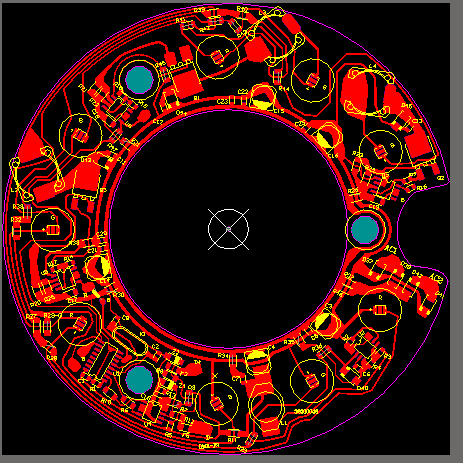
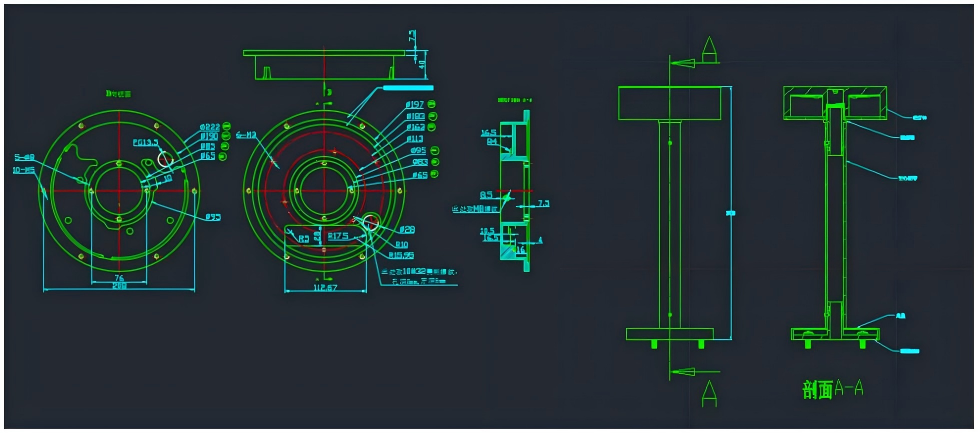
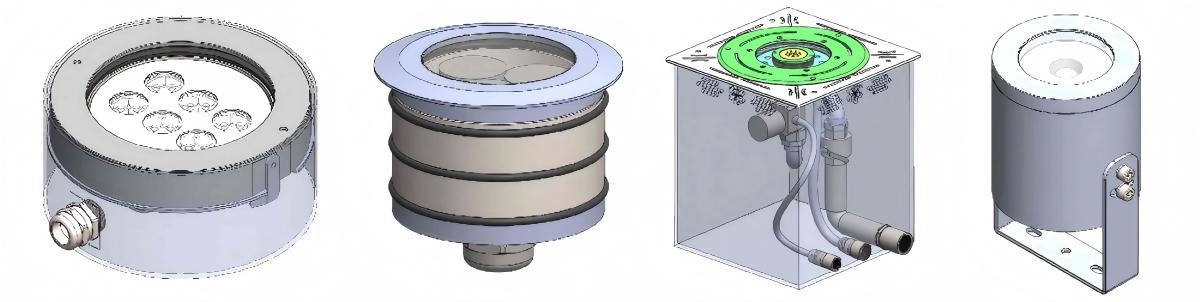
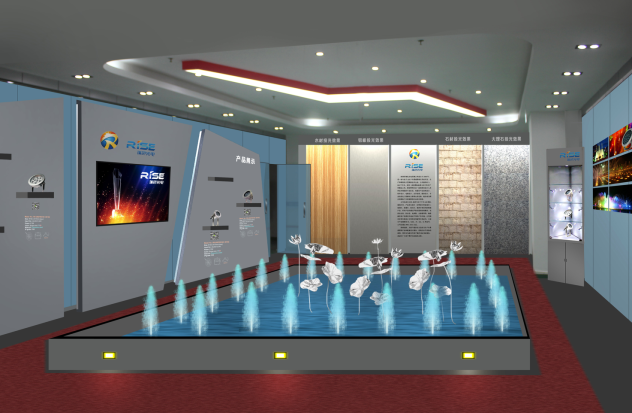
From 2D graphic design to 3D model creation, making new mold, and finally, prototyping the finished product, we have 15 years of design and innovation experience.
Let's have a brainstorming session. Give us an idea, and we'll help you realize the product and solution you need.
When you turn on the tap, have you ever wondered if the magnesium ion content in the water meets standards? During farm irrigation, how can you determine if the water quality will cause soil compaction? In industrial production, how to prevent pipeline scaling caused by high-magnesium water? These seemingly trivial issues are closely linked to the accurate monitoring of magnesium ions in water. In the past, monitoring methods relying on manual sampling and laboratory analysis were not only time-consuming and labor-intensive but also struggled to capture real-time water quality fluctuations. Today, the emergence of LoRaWAN magnesium ion water quality sensors is redefining the efficiency and precision of water quality monitoring with their advantages of "low power consumption, wide coverage, and real-time data transmission."
Argument 1: Technological Integration Breaks Through, Solving Three Core Pain Points of Traditional Monitoring
Traditional magnesium ion monitoring has long been plagued by "data lag, heavy operation and maintenance (O&M) workload, and high costs." Data from third-party testing institutions shows that laboratory analysis of magnesium ions using atomic absorption spectrometry takes 7-10 working days to yield results, with a single test cost exceeding RMB 200. While analog sensors enable on-site monitoring, they require weekly calibration – a county-level water plant alone incurs annual calibration labor costs exceeding RMB 120,000, with a data error margin of ±5% FS, far exceeding the requirements of the National Sanitary Standards for Drinking Water (GB 5749-2022).

The LoRaWAN magnesium ion water quality sensor thoroughly addresses these challenges through the deep integration of "high-precision sensing" and "low-power IoT technology." Its core advantages stem from complementary technical features:

Argument 2: Full-Scenario Coverage, Serving as a "Water Quality Sentinel" Across Industries
The value of magnesium ion monitoring spans agriculture, industry, and daily life. Leveraging LoRaWAN's wide coverage and strong adaptability, the sensor seamlessly adapts to complex environments – from urban water pipelines to remote farmlands – acting as an omnipresent "water quality sentinel."
In Agriculture
Magnesium is a key element for plant chlorophyll synthesis. An imbalance in the calcium-magnesium ratio (Ca²⁺/Mg²⁺ < 1) in irrigation water can cause soil compaction, while available magnesium levels below 50 mg/kg trigger crop nutrient deficiencies. A smart farm deployed 20 sensors in its irrigation system to real-time monitor magnesium concentration (controlling the threshold at ≤50 mg/L), with data transmitted to an agricultural cloud platform via LoRa gateways. When low magnesium levels are detected, the system automatically triggers a water-fertilizer integrated machine to supplement magnesium sulfate solution, precisely adjusting water quality. After six months of implementation, the farm achieved an 8% increase in wheat thousand-grain weight and a 15% improvement in irrigation water use efficiency, eliminating resource waste caused by traditional experience-based fertilization.
In Industry
High-magnesium water, when combined with calcium and silicon, tends to form insoluble scales that reduce the lifespan of boilers and cooling systems. A power plant introduced the sensor to monitor magnesium ion content in circulating cooling water, adjusting scale inhibitor dosage in real time in line with the 0.1-50 mg/L range specified in GB/T 14636-2021. This completely resolved heat exchange efficiency issues caused by scaling, saving over RMB 200,000 annually in maintenance costs per boiler while reducing chemical reagent usage – achieving a win-win for environmental protection and economic benefits. In water treatment plants, the sensor provides 24/7 monitoring of magnesium content in finished water, ensuring compliance with the WHO limit of ≤50 mg/L and safeguarding safe drinking water for residents.

Argument 3: Data-Driven Decision-Making, Empowering the Upgrade of Smart Water Quality Management

From cumbersome laboratory testing to real-time on-site sensing, the LoRaWAN magnesium ion water quality sensor has broken the temporal and spatial limitations of water quality monitoring through technological innovation. As IoT technology advances, such "small yet powerful" sensing devices will become increasingly prevalent, not only providing precise and efficient monitoring solutions for various industries but also serving as a critical force in safeguarding water resource security and promoting green development. In the future, as every drop of water flows past a "smart sentinel," our access to high-quality water resources will draw closer than ever.
As a crucial device for modern agriculture and environmental monitoring, the LoRaWAN solar-powered soil sensor requires special attention to the maintenance of key components such as the solar power supply system, soil probes, and data transmission modules. Below is a professional maintenance guide for this type of sensor:
1、 Key points of daily maintenance
Sensor position check
Surface cleaning and maintenance
2、 Maintenance of solar power supply system
Solar panel maintenance
Probe cleaning method
Probe calibration check
Radio system inspection
Network connection testing
Special maintenance during rainy season
6、 Professional maintenance tools and spare parts
Recommended maintenance toolkit
Against the backdrop of the accelerated advancement of global agricultural modernization, precision agriculture has become the core path for enhancing agricultural production efficiency, ensuring food security, and achieving sustainable agricultural development. As a core device for obtaining key soil data in precision agriculture, the LoRaWAN soil sensor not only resolves many pain points of traditional agriculture, providing a scientific basis for management decisions such as precise irrigation and precise fertilization, but also promotes the deep integration of agriculture and advanced technologies with its excellent performance, becoming an important engine driving the modernization and upgrading of agriculture. as follows:
1.Solving the pain points of traditional agriculture, the LoRaWAN soil sensor is the core hub for data acquisition
2. Empowering precision agricultural management, LoRaWAN soil sensors are a key basis for decision-making
3.LoRaWAN soil sensors are an important engine for industrial transformation, promoting the modernization and upgrading of agriculture

Summary
In the future, as precision agriculture further develops, the significance of LoRaWAN soil sensors will become increasingly prominent, injecting stronger impetus into the high-quality development of global agriculture.
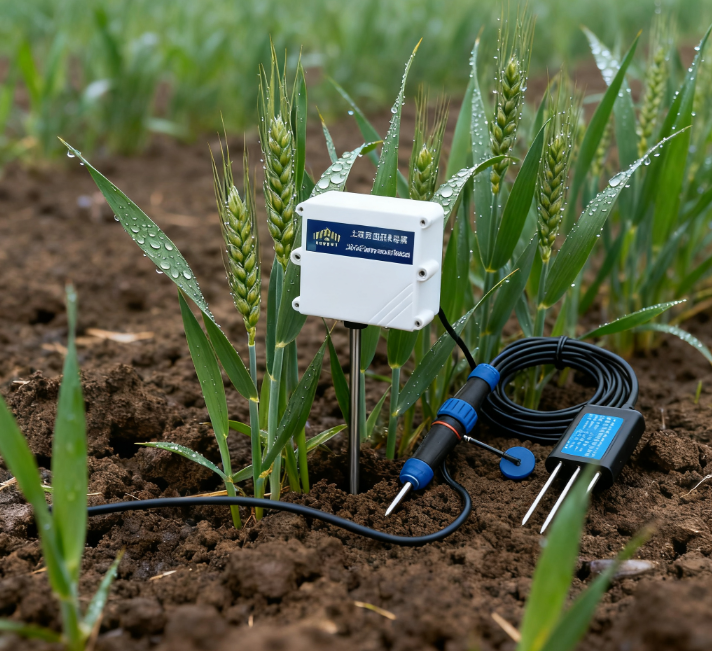
Precise monitoring of soil indicators:
The LoRaWAN soil EC sensor can measure soil electrical conductivity in real time and accurately, thereby reflecting the content of soluble salts and nutrient status in the soil. For instance, by monitoring the EC value, one can promptly understand the changes in nutrients in the soil after fertilization and determine whether additional fertilizers are needed. Additionally, during the growth of crops, the extent to which the crops absorb nutrients can be known based on the decline in the EC value. In addition, it can also indirectly assess the moisture content of the soil, as the soil moisture content will affect the soil's electrical conductivity, and thereby influence the measurement result of the EC value.
Facilitate automation and intelligent management:

Summary:
The reason why LoRaWAN solar soil EC sensor can become the "soil doctor" of smart agriculture lies in its deep integration of soil conductivity (EC) precise sensing technology, solar autonomous power supply technology, and LoRaWAN low-power long-distance transmission technology, achieving the core requirements of "no wiring, long-term duty, and precise monitoring". Its working principle can be broken down into four key modules, forming a complete closed loop from soil parameter collection to data terminal application.
1、 Core Perception Layer: Measurement Principle of Soil EC Value and Associated Parameters
The core function of sensors is to accurately capture soil EC values (reflecting salinity/fertility), moisture, and temperature. The measurement principles of these three parameters directly determine the accuracy of the data and are also the basis for guiding agricultural management.
2、 Energy supply layer: complementary dual energy of solar energy and batteries
Sensors need to be unmanned in the field for a long time, so the solar powered autonomous power supply system is the guarantee for their stable operation, and the core is the collaborative work of "solar charging+battery energy storage":
3、 Data transmission layer: Low power long-distance communication using LoRaWAN protocol
The EC value, moisture, and temperature data collected by sensors need to be remotely transmitted to a cloud platform, relying on the LoRaWAN protocol to achieve the communication requirements of "low power consumption, long distance, and wide coverage"
4、 Data application layer: accuracy guarantee for calibration and compensation
The raw data needs to be calibrated and compensated before it can be truly used for agricultural decision-making, which is a key step for sensors from "data collection" to "value output":
When selecting a water quality multi parameter sensor monitoring instrument, it is necessary to comprehensively evaluate the four core dimensions of monitoring demand matching, equipment performance reliability, scene adaptability, and operation and maintenance convenience, in order to avoid monitoring failure caused by parameter mismatch or insufficient performance. The following are key considerations, sorted by priority:
1、 Core premise: Clearly define "monitoring requirements" and match key parameters
The core value of a monitoring device is to accurately obtain target water quality indicators. It is necessary to first clarify "what to measure and what accuracy to measure", in order to avoid blindly pursuing multiple parameters and neglecting core requirements:
1.1 Determine the required parameters based on the application scenario and lock in the core indicators, instead of default selection of "full parameters" (some parameters may be redundant, increasing costs). For example:
Drinking water monitoring: residual chlorine, turbidity, pH value, and water temperature must be selected (some scenarios require additional testing of heavy metals and TOC);
Aquaculture: dissolved oxygen (DO), water temperature, ammonia nitrogen, pH value (additional salinity measurement is required for seawater aquaculture) must be selected;
Industrial wastewater: COD, ammonia nitrogen, pH value, and suspended solids (SS) must be selected (total phosphorus and total nitrogen may need to be measured for chemical wastewater). Attention: Priority should be given to selecting models with "expandable parameters" to avoid the need for re procurement in case of future demand changes.
1.2 Confirming the accuracy of parameters and range directly determines the validity of data, and it is necessary to match the tolerance of the scene for errors:
For example, the accuracy of dissolved oxygen in aquaculture needs to reach ± 0.1mg/L (excessive error can cause the aerator to trigger or not trigger); The COD range of industrial wastewater needs to cover 0-1000mg/L (high concentration wastewater needs to support measurement after dilution, or choose a high range sensor);
To avoid "high precision leading to cost waste": For example, in scenic water monitoring, there is no need to pursue laboratory grade accuracy (such as turbidity ± 0.01NTU), and industrial grade ± 0.1NTU can meet the demand.
2、 Equipment performance: Ensure "long-term stability" and adapt to complex water environments
Water quality monitoring devices are often deployed outdoors or in harsh water environments (such as highly polluted wastewater and high salt seawater), and their performance stability directly affects their service life and data continuity
2.1 The sensor material and anti pollution ability material should be resistant to water corrosion, scaling, and biological attachment (to avoid frequent cleaning leading to data interruption):
Sensor probes that come into contact with water bodies: 316L stainless steel, titanium alloy (acid and alkali resistant, suitable for industrial wastewater) or PPS engineering plastic (lightweight, suitable for freshwater/seawater) are preferred;
Anti biological attachment design: Choose models with "automatic cleaning function" (such as ultrasonic cleaning, brush cleaning), especially suitable for eutrophic water bodies (such as lakes and fish ponds), to reduce the accuracy decrease caused by algae and microbial attachment.
2.2 Data stability and calibration cycle
Long term stability: prioritize sensors with "small drift" (such as dissolved oxygen sensors with monthly drift ≤ 0.05mg/L) to avoid frequent calibration;
Calibration convenience: Supports "on-site calibration" (no need to disassemble back to the laboratory) or "automatic calibration" (for example, some models can preset calibration cycles and automatically calibrate with standard solution), reducing the difficulty of operation and maintenance (especially in remote scenarios where manual calibration costs are high).
2.3 Power Supply and Communication: Adapting to Deployment Environments
Power supply method:
Outdoor areas without power grid: choose solar power supply+lithium battery backup (need to confirm the power of the solar panel, such as 10W or more, suitable for rainy weather endurance, recommended endurance ≥ 7 days);
In areas with power grids: choose AC220V power supply+lithium battery backup (to prevent data loss caused by power outages);
Communication method:
Long distance (such as river basins and offshore aquaculture): Priority is given to LoRaWAN (transmission distance 1-10km, low power consumption, no wiring required);
Urban dense areas (such as municipal pipeline networks): 4G/5G/NB IoT (with strong real-time performance and confirmation of operator signal coverage) can be selected;
Laboratory/Small Range: Optional RS485/Bluetooth (close range wired/wireless transmission, low cost).
3、 Scenario adaptation: Match the "installation environment" to reduce deployment barriers
The installation conditions and water characteristics vary greatly in different scenarios, and it is necessary to ensure that the equipment can be installed, used, and durable:
3.1.Installation method: Suitable for water body morphology
River/lake (open water area): Choose float installation (anti overturning design is required, such as adjustable draft and wind and wave resistance level ≥ 4);
Pipe network/sewage outlet (closed pipeline): Choose pipeline installation (matching pipe diameter, such as DN50/DN100 flange interface, to avoid water leakage);
Shallow water area/shore (such as fish ponds and wetlands): Choose shore support/insertion type (no need for buoys, easy installation, and prevention of sedimentation).
3.2 Protection level: Suitable for harsh environments
Outdoor deployment: the protection level of core components (host and junction box) shall be ≥ IP66 (rainstorm and dustproof);
Underwater sensors: Protection level must be ≥ IP68 (long-term immersion without leakage, some models support a depth of 10 meters underwater);
Low/high temperature environment: The working temperature range needs to be confirmed, such as -20 ℃~60 ℃
3.3Anti-interference ability
Industrial scenarios (such as near chemical plants and power plants): It is necessary to choose models with "anti electromagnetic interference (EMC)" design to avoid strong electrical and RF signals affecting data transmission;
High salt environment (seawater aquaculture): It is necessary to choose a host casing that is "anti salt spray corrosion" to extend the service life of the equipment.
4、 Operations and Data: Reducing Long Term Costs and Ensuring Data Availability
The difficulty of subsequent operation and maintenance of the equipment, as well as the efficiency of data processing, directly affect long-term usage costs
4.1.Convenience of operation and maintenance
Consumables replacement: Priority should be given to models with "low consumables" or "easily replaceable consumables" (such as dissolved oxygen sensor membranes that can be replaced on-site without the need for a complete sensor replacement);
Fault warning: supports "remote monitoring of device status" (such as battery level, sensor failure, communication interruption) to avoid problems only being discovered during manual inspections (especially in remote scenarios);
Weight and size: Outdoor installation models need to be lightweight (such as buoy type total weight ≤ 5kg), easy to transport and install, and reduce labor costs.
4.2.Data management capability
Data storage and export: Supports "local storage+cloud storage" (local storage prevents network interruption and data loss, such as SD card storage for ≥ 6 months of data; Cloud support for historical data query and trend analysis;
Platform compatibility: Can be integrated with third-party platforms, supports API interfaces, MQTT protocol (to avoid data silos, no need for additional development and integration);
Alarm function: Supports "multi-dimensional alarms" (such as parameter exceedance, equipment failure), and the alarm methods can be selected from SMS, APP push, and platform pop ups.
Summary: Choose Logic
Firstly, clarify the core requirements of "monitoring parameters, accuracy, and scenarios";
Re match "sensor material, power supply communication, performance adaptation;
Finally evaluate the difficulty of operation and maintenance, data management, and long-term costs.
Through the above screening, it can be ensured that the selected water quality multi parameter sensor monitoring instrument is "accurate, stable, user-friendly, and economical", truly meeting the actual monitoring needs.
