"The lake water suddenly turns green and stinks, with a large number of dead fish" "The tap water has an unusual odor, and algal toxins exceed the standard" —— Behind these worrying water quality problems, there is an abnormal key indicator: chlorophyll concentration. As the "barometer" of water eutrophication, real-time monitoring of chlorophyll is the core link to prevent algal bloom disasters and ensure water safety. The LoRaWAN water quality chlorophyll sensor we are going to introduce today has become the "smart sentinel" in the field of water quality monitoring with its advantages of low power consumption and wide coverage.


Why Traditional Water Quality Monitoring Falls Short?

  • Before the popularization of LoRaWAN technology, chlorophyll monitoring in water often faced many challenges. Traditional laboratory testing requires manual on-site sampling, which is not only time-consuming and labor-intensive, but also has the problem of "outdated as sampled", failing to capture real-time changes in water quality. Wired monitoring equipment can transmit data in real time, but the wiring cost is extremely high, making it almost impossible to deploy in scenarios such as remote reservoirs and vast lakes. Ordinary wireless sensors are limited by communication distance and power consumption; either they need frequent battery replacement, or data transmission is often interrupted, making it difficult to achieve long-term stable monitoring.
  • These pain points have put water quality management departments and enterprises in a dilemma of "wanting to monitor but struggling to monitor" —— When an algal bloom is detected, the best governance opportunity is often missed, resulting in serious ecological losses and economic costs.


LoRaWAN + Chlorophyll Monitoring: Unlocking a New Way of Water Quality Monitoring

The emergence of LoRaWAN water quality chlorophyll sensors has completely broken the limitations of traditional monitoring. It perfectly integrates fluorescence-based chlorophyll detection technology with LoRaWAN low-power wide-area network technology, ensuring detection accuracy while solving the core problems of data transmission and equipment battery life.

1. Accurate Detection: Make Every Data "Reliable"

The sensor adopts the professional fluorescence detection principle. Chlorophyll in water will emit characteristic fluorescence when irradiated by a light source of a specific wavelength, and its intensity is strictly proportional to the concentration. Equipped with a high-precision optical filter and a temperature compensation module, the sensor can effectively filter stray light interference and automatically correct errors caused by water temperature changes. The detection accuracy can reach 0.01μg/L, and the reproducibility is ≤3%. Even small changes in low-concentration chlorophyll can be accurately captured, providing reliable data support for algal bloom early warning.

2. Low Power Consumption & Long Service Life: "Zero Burden" Even in Remote Scenarios

Relying on the ultra-low power consumption characteristics of the LoRaWAN protocol, the sensor's power consumption is only tens of milliamps when actively uploading data, and as low as microamp level when in sleep mode. With lithium battery power supply, it can work continuously for 6-12 months without external power supply; if equipped with a solar power supply module, it can achieve long-term monitoring with "uninterrupted power supply". It can be easily deployed in small reservoirs in deep mountains or mariculture areas far from the coast, completely getting rid of the dependence on the power grid.


3. Wide-Area Transmission: "Unobstructed" Even in Complex Environments

It supports global mainstream frequency bands such as 470MHz (China), 868MHz (Europe), and 915MHz (America). The communication distance can reach 3-5 kilometers in an open environment. Even around lakes with dense trees or water plants surrounded by buildings, stable data transmission can be realized through LoRaWAN gateways. Multiple sensors can be connected to the same gateway, easily building a monitoring network covering tens of square kilometers. Data is uploaded to the cloud platform in real time, which can be viewed at any time on mobile phones and computers.

4. Durable: "Stable Operation" Even in Harsh Environments

Adopting 316L stainless steel shell and high-strength optical glass, the protection level reaches IP68, which can be completely submerged in water for long-term work. It can withstand a wide temperature range of -20℃ to 80℃, and can operate stably whether in frozen reservoirs in the north or high-temperature fish ponds in the south. Some models are also equipped with ultrasonic automatic cleaning functions, which effectively prevent algae and microorganisms from adhering to the probe and reduce the frequency of manual maintenance.


These Scenarios All Need Its Protection

  • Natural Water Ecological Governance: Deploy sensors in lakes prone to algal blooms (such as Taihu Lake and Dianchi Lake) and important river basins such as the Yangtze River and the Yellow River to monitor changes in chlorophyll concentration in real time. When the data exceeds the early warning threshold, the system automatically sends SMS or APP push notifications, helping management departments take measures such as water replacement and algicide application in advance to eliminate algal bloom disasters in the bud.
  • Drinking Water Source Protection: Install sensors around the water intake of waterworks and drinking water source protection areas to monitor chlorophyll and cyanobacteria concentrations 24 hours a day. Once exceeding the standard is detected, the waterworks' purification process is immediately triggered to adjust, preventing algal toxins from entering the drinking water pipe network and ensuring the safety of residents' water use.
  • Intelligent Aquaculture Management: Deploy sensors in aquaculture waters such as fish ponds and shrimp ponds. Excessively high chlorophyll concentration often means eutrophication of the water body, which is easy to cause fish and shrimp to die of hypoxia. The sensor feeds back the water quality in real time, helping farmers scientifically adjust the feeding amount and water change frequency, reducing the occurrence of diseases and improving the survival rate of aquaculture.
  • Industrial Wastewater Discharge Monitoring: Industrial enterprises install sensors at wastewater discharge outlets to monitor the chlorophyll concentration in the discharged water in real time, ensuring that the discharged water quality meets national standards, avoiding pollution of surrounding water bodies by wastewater, and reducing the risk of environmental protection penalties.


Choose Us to Simplify Water Quality Monitoring

Our LoRaWAN water quality chlorophyll sensor not only has the above core advantages, but also can provide you with customized monitoring solutions: from sensor selection, network planning, to cloud platform construction and data visualization analysis, we provide one-on-one technical support throughout the process. Whether it is a government water quality monitoring project or an enterprise production and operation demand, we can meet your accurate monitoring needs.

Consult now to get free on-site survey and scheme design services, and let the "smart sentinel" protect your water quality safety!


Introduction: The "Invisible Threat" of H₂S Calls for Professional Protection

In many industries such as petrochemicals, sewage treatment, and mining, hydrogen sulfide (H₂S) is an extremely dangerous gas—it is colorless, highly toxic, and can cause discomfort even at low concentrations, while high concentrations can be life-threatening in a short time.

Due to its characteristics of "invisible, detectable by smell but easily ignored", the traditional manual inspection method is not only inefficient but also difficult to achieve real-time and accurate risk early warning. Against this backdrop, the ZONEWU Wireless LoRaWAN Hydrogen Sulfide Sensor came into being, using technological innovation as a fulcrum to build a solid "invisible defense line" for industrial safety.


Core Advantage 1: Empowered by LoRaWAN Technology, Breaking Through Transmission Bottlenecks

As a professional sensor for industrial scenarios, the most prominent advantage of the ZONEWU H₂S Sensor is its integration of LoRaWAN wireless communication technology. Compared with traditional wired transmission, LoRaWAN technology has three core highlights: first, ultra-long transmission distance, which can reach several kilometers in an open environment, and can transmit data stably even in complex scenarios with dense workshops and many wall obstacles; second, ultra-low power consumption design, the sensor adopts a high-efficiency energy-saving chip, combined with an intelligent sleep mechanism, which can work continuously for months or even years after a single charge or battery replacement, greatly reducing the later maintenance cost; third, strong anti-interference ability, which can effectively avoid signal interference from other wireless devices in the industrial environment, ensuring the accuracy and stability of data transmission.


Core Advantage 2: Accurate Monitoring + Fast Response, Building the First Line of Safety

For gas sensors, "accuracy" is the foundation. The ZONEWU H₂S Sensor adopts the high-precision electrochemical detection principle, which can accurately capture hydrogen sulfide gas in the air within the concentration range of 0-100ppm, and the detection error is controlled within ±5%FS, which is far better than the industry average.

At the same time, the sensor has a fast response capability. When the gas concentration reaches the preset threshold, it will not only remind on-site personnel through sound and light alarms locally but also upload the alarm information and real-time concentration data to the cloud platform within 1 second, allowing managers to grasp the risk dynamics in the first time even if they are not on-site, and gain valuable time for emergency response.


Core Advantage 3: Full-Scenario Adaptation, Convenient and Efficient Operation

The diversity of industrial scenarios puts forward high requirements for the adaptability of sensors. The ZONEWU H₂S Sensor adopts an IP67 high protection level design, which is waterproof, dustproof, and corrosion-resistant. It can operate stably whether in a humid sewage treatment tank, a high-temperature chemical reaction area, or a dusty mine tunnel. In terms of installation and operation, the sensor supports multiple installation methods such as wall-mounted, pipeline, and bracket. No complicated wiring project is required, and installation and commissioning can be completed in 10 minutes. The supporting cloud platform also has functions such as data visualization, historical data query, and abnormal data traceability. Managers can realize remote monitoring and management through a computer or mobile APP, which greatly improves the efficiency of safety management.


Practical Application: Safety Protection from Laboratory to Production Line

At present, the ZONEWU Wireless LoRaWAN Hydrogen Sulfide Sensor has been widely used in many fields. In a large petrochemical refinery, sensors are installed in the crude oil extraction and sewage treatment links to monitor equipment leakage in real-time. Since its commissioning, it has successfully warned of 3 minor leaks, avoiding safety accidents; in a municipal sewage treatment plant, the sensor has replaced the traditional manual inspection, which not only increased the inspection efficiency by 80% but also provided a scientific basis for equipment maintenance through data trend analysis; in the mining scenario, the sensor is linked with the emergency system.

Once the H₂S concentration is detected to exceed the standard, it will immediately automatically start the ventilation equipment and cut off the power in the dangerous area, providing strong protection for the life safety of miners.


Conclusion: Guarding Every Bit of Safety with Technological Innovation

In today's era where industrial safety is increasingly valued, the ZONEWU Wireless LoRaWAN Hydrogen Sulfide Sensor has become a powerful assistant for enterprises to prevent H₂S risks with its core characteristics of "accuracy, stability, and efficiency".

It not only solves the pain points in traditional safety monitoring but also promotes the upgrading of industrial safety management models through digital and intelligent means. In the future, ZONEWU will continue to deepen its focus on the gas sensing field, and provide strong support for the safe development of various industries with more advanced technologies and better products.


It was 3 a.m. in the chemical industrial park, and the moonlight stretched the shadows of the pipelines long. Old Zhang's walkie-talkie suddenly crackled with static, followed by the sharp beep of an automatic system alarm— the hydrogen concentration in the eastern storage area had exceeded the warning threshold. He grabbed his safety helmet and rushed to the scene, but halfway there, he received a precise location alert from the sensor node: "Valve interface of Pipeline 3, leak concentration 0.4%, diffusion rate 0.02% per minute." Twenty minutes later, the leak was successfully sealed, and a potential explosion crisis was nipped in the bud. Staring at the stable curve on the equipment screen, Old Zhang recalled the near-disaster caused by a hydrogen leak five years ago and sighed, "Now we don't chase after hidden dangers; the sensors 'shout' them out to us." The wisdom behind making hydrogen—this invisible, intangible "hidden killer"—"speak up" lies in the collaboration between LoRaWAN technology and H₂ gas sensors.


As both a clean energy source and an industrial raw material, hydrogen has long permeated numerous fields such as chemical engineering, energy, and electronics. However, its flammable and explosive properties have always been a "Sword of Damocles" in industrial production—when the hydrogen concentration in the air reaches the explosive limit of 4% to 75.6%, even a tiny spark can trigger catastrophic consequences. Before the popularization of LoRaWAN technology, H₂ gas monitoring had long been trapped in a dilemma: "What is visible is inaccurate, and what is accurate is invisible." Back then, sensors either relied on wired connections, which were costly and inflexible to deploy in large industrial parks, leaving remote pipeline nodes completely uncovered; or they used short-range wireless technology, with a transmission distance of no more than 100 meters, and their data was often scrambled by electromagnetic interference in industrial environments. Old Zhang still remembers that during the leak five years ago, the traditional sensor didn't issue an alarm until 20 minutes after the concentration exceeded the standard. By the time they found the leak point, hydrogen had already spread to the entrance of the operation workshop.


The emergence of LoRaWAN technology is like equipping H₂ gas sensors with "long-distance ears" and "intelligent brains," completely breaking the monitoring predicament. This low-power wide-area network protocol based on spread spectrum technology has three core advantages: "long range, energy efficiency, and stability." Its transmission distance can reach several kilometers or even more than ten kilometers, perfectly matching the vast scale of industrial parks; the battery life of a single sensor node can easily reach 3 to 5 years, eliminating the need for frequent power replacements and solving the power supply problem in remote areas; its anti-interference ability is particularly outstanding—even in industrial environments filled with motors and frequency converters, it can transmit data stably without "distortion." When an H₂ gas sensor is equipped with a LoRaWAN module, it forms a complete closed-loop from "perception" to "transmission" and then to "early warning": the electrochemical element at the core of the sensor captures hydrogen molecules in the air in real time, converts the concentration signal into an electrical signal, encrypts it via the LoRaWAN module, and uploads it to a gateway. The gateway then forwards the signal to a cloud platform, which uses algorithms to analyze and determine whether to trigger an early warning. Finally, alerts are sent to staff through multiple channels such as text messages, APP notifications, and on-site sound and light alarms. The entire process takes less than one second, truly realizing "catching hidden dangers as soon as they appear."


The combination of LoRaWAN and H₂ gas sensors is not just a superposition of technologies, but a revolution in industrial safety concepts—shifting from "passive remedy" to "proactive defense." Behind this transformation, three core arguments support its irreplaceable value. Firstly, its wide coverage solves the "blind spot problem" in industrial monitoring. Traditional monitoring equipment is often concentrated in core production areas, while "edge areas" such as pipeline routes and storage area perimeters tend to become regulatory blind spots. LoRaWAN's long-distance transmission capability allows "full-coverage" deployment of sensors; even in underground pipeline wells, data can be transmitted back to the platform through relay nodes. Secondly, its low-power advantage reduces the "hidden costs" of safety management. For parks with thousands of monitoring nodes, frequent battery replacements not only consume manpower and material resources but also may cause monitoring interruptions during replacement. The long battery life of LoRaWAN sensors fundamentally solves this problem, making safety management more efficient and stable. Thirdly, its data interconnection capability builds an "overall prevention and control network." Early warnings from a single sensor are just "point" reminders, while LoRaWAN technology can aggregate data from all nodes into a "surface" profile. By analyzing the concentration change trends in different areas, the platform can predict the direction of leak diffusion and provide a scientific basis for emergency response—like equipping safety managers with "prescient" eyes.


Today, in chemical industrial parks, more and more H₂ gas sensors are "on duty" with the help of LoRaWAN technology. They attach quietly to pipelines and hide beside equipment, capturing the "breath" of hydrogen 24 hours a day. Old Zhang's role has also changed from a "patrolman" in the past to a "commander" now. He only needs to sit in the monitoring room to grasp the situation of all monitoring points through the screen. Those beating numbers and stable curves form the most reassuring scenery in industrial production.


From invisible hidden dangers to visible data, from passive response to proactive prevention, LoRaWAN technology has transformed H₂ gas sensors from "monitoring tools" to "safety guards." In the wave of energy revolution and industrial intelligence, such technological integration is constantly happening. They may not have a gorgeous appearance, but with every accurate perception and every stable transmission, they strengthen the safety line for industrial production. And guardians like Old Zhang, with the support of these technologies, are making the goal of "zero accidents" increasingly within reach—when hydrogen learns to "speak up," safety gains its most reliable voice.


You rely on tft lcd screen technology to overcome visibility challenges in modern electronics. Advanced features such as optimized brightness, improved contrast, and innovative anti-reflective solutions deliver remarkable clarity in tough lighting conditions. The Golden Vision 3.5 Inch IPS lcd module tft display showcases these innovations, offering vibrant colors and wide viewing angles. With high brightness and adaptive lcd module tft solutions, you experience enhanced legibility whether you use consumer or industrial tft lcd displays. The latest lcd module tft advancements ensure every solution meets your expectations for performance and reliability.

Feature

Impact on Visibility

High Brightness

Improves outdoor readability and legibility

Optical Bonding

Reduces glare and boosts clarity

IPS Panel Technology

Delivers consistent color and image quality from all angles


Key Takeaways

  • TFT LCD technology enhances visibility in bright environments with high brightness and anti-reflective features.

  • Sunlight-readable displays improve legibility outdoors, making them ideal for medical monitors and outdoor kiosks.

  • Optical bonding reduces glare and enhances clarity by eliminating air gaps between screen layers.

  • IPS panel technology provides consistent color and image quality from all viewing angles, improving user experience.

  • Adaptive brightness control automatically adjusts screen brightness based on surrounding light, reducing eye strain.

  • Choosing displays with customizable backlight options allows you to balance visibility and energy efficiency.

  • Robust TFT LCD solutions operate reliably in extreme temperatures, ensuring performance in harsh conditions.

  • Selecting the right display involves considering application needs, brightness levels, and durability for optimal performance.

Visibility Challenges for TFT LCD Screens

Modern electronics rely on lcd module tft technology to deliver clear visuals in diverse environments. You encounter several challenges that can impact visibility and readability, especially when using devices outdoors or in demanding settings. Understanding these obstacles helps you choose the right lcd module tft solutions for your needs.


Sunlight and Glare Issues

Outdoor environments present significant hurdles for tft lcd screen performance. Sunlight and glare can dramatically reduce the effective contrast ratio, making images and text nearly unreadable. For example, when sunlight reflects off the display, the contrast ratio may drop from 400:1 to just 2:1. This drastic change means you struggle to see important information on your device. Increasing the brightness or applying anti-reflective coatings can help restore readability and enhance visibility. You benefit from sunlight-readable tft lcd displays in devices like medical monitors, outdoor kiosks, and consumer electronics such as smart coffee machines. These solutions ensure you maintain clear visuals even under direct sunlight.


Tip: Choose lcd module tft displays with high brightness and anti-reflective features for outdoor use. This approach improves readability and reduces eye strain.


Challenge

Symptoms

Causes

Solutions

Backlight Bleeding

Light leaks around screen edges

Imperfect panel assembly or uneven LED backlight distribution

Adjust brightness levels, use local dimming settings, replace panel if excessive

Uneven Brightness

Variations in brightness across the screen

Poor manufacturing quality or design flaws

Adjust brightness settings, consider panel replacement

Flickering Screens

Noticeable flicker during refresh cycles

Faulty driver IC, unstable power supply

Update display drivers, stabilize power input, replace faulty components


Temperature and Environmental Factors

Environmental conditions play a crucial role in lcd module tft display performance. High humidity can cause electrical malfunctions, corrosion, and fogging, which reduce visibility. Adhesive failures may lead to separation of screen layers, affecting overall performance. Extreme temperatures also pose risks. High temperatures can darken the display, limiting visibility, while low temperatures slow response times and increase power consumption. In some cases, the liquid crystal may freeze, reducing light passage and contrast. You need lcd module tft displays designed for robust operation in harsh conditions to ensure consistent readability.

  • High humidity leads to fogging and reduced visibility.

  • High temperatures cause darkening and limited readability.

  • Low temperatures slow response times and increase power usage.

  • Adhesive failures can separate screen layers, impacting performance.


Viewing Angle Limitations

Viewing angle is another critical factor in enhancing visibility. Poor viewing angles result in color shifting and contrast degradation, making dark scenes hard to discern. You may experience user dissatisfaction, especially when multiple people view the screen at once. In medical settings, accurate and stable visuals are essential for healthcare professionals. A poor viewing angle can lead to misinterpretation, which may affect patient care. Consumer devices also benefit from wide viewing angles, ensuring everyone sees the same clear image regardless of their position.

  • Color shifting occurs at oblique angles.

  • Contrast drops, making details harder to see.

  • Multiple viewers may struggle to interpret information accurately.

You improve user experience and safety by selecting tft lcd displays with wide viewing angles and sunlight-readable tft lcd features. These solutions support enhancing visibility in both consumer and industrial applications.
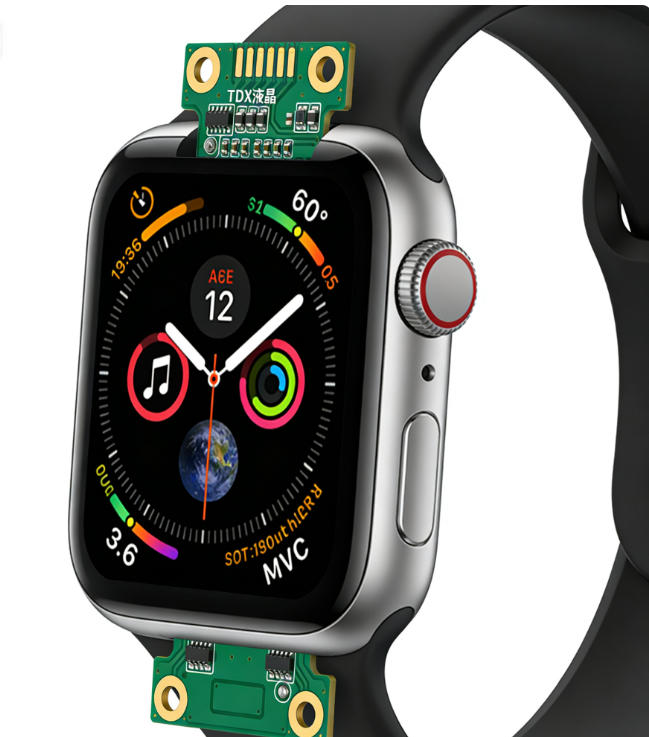
3.5 Inch IPS lcd module tft display


When you use electronic devices outdoors or in brightly lit environments, you need displays that remain clear and easy to read. Sunlight-readable tft lcd solutions address this challenge by using advanced backlight technology and adaptive brightness features. These innovations ensure that your device delivers excellent readability in sunlight and other high-glare conditions.


High-Brightness Backlight

High brightness is essential for achieving readability in sunlight. Standard tft lcd displays often struggle in outdoor settings because their backlight cannot compete with direct sunlight. You need a display that produces enough high-brightness light to overcome glare and maintain image clarity.


The Golden Vision 3.5 Inch IPS tft lcd display module features a luminance of 350cd/m². While industry standards for daylight-readable liquid crystal displays often start at 800 nits and go up to 1000 nits for true sun readable lcd performance, a 350cd/m² backlight still offers a significant improvement over typical indoor displays. This level of brightness ensures that you can view images and text with greater clarity, even when ambient light is strong.

Feature

Specification

Panel Size

3.5 Inch

LCD Type

IPS

Luminance

350cd/m²

View Angle

ALL

Module Size

76.9x63.85x2.85 MM

Display Area

70.08x52.56 MM

Number of Dots

640x480


You benefit from high-brightness backlight technology in many applications. Medical devices, outdoor kiosks, and industrial controls all require reliable lcd module tft displays that perform well in sunlight. High-brightness solutions help you avoid washed-out screens and ensure that critical information remains visible.


Customizable Backlight Units

Customizable backlight units give you the flexibility to adjust brightness based on your specific needs. The Golden Vision lcd module tft display allows you to tailor the backlight intensity, which helps you balance power consumption and visibility. For portable devices, you can lower the backlight to save energy indoors and increase it for outdoor use. This adaptability makes lcd module tft solutions ideal for a wide range of environments.

  • You can set the backlight to maximum for outdoor readability.

  • You can reduce the backlight indoors to extend battery life.

  • Customizable backlight units support both consumer and industrial applications.

Adaptive Brightness Control

Adaptive brightness control further enhances your experience by automatically adjusting the backlight based on ambient light conditions. Sensors detect the surrounding light and increase the backlight in bright environments or decrease it in low-light settings. This feature ensures that your tft lcd screen always provides optimal readability without manual adjustments.


You gain several advantages from adaptive brightness:

  • Improved readability in sunlight and shade.

  • Reduced eye strain as the display adapts to changing conditions.

  • Consistent performance across different environments.

Sunlight readable solutions, such as those found in the Golden Vision lcd module tft display, combine high-brightness backlight, customizable units, and adaptive brightness control. These features ensure that your device remains visible and user-friendly, whether you use it in direct sunlight or indoors. You can rely on these tft lcd displays for critical applications where visibility matters most.


Note: When you select a tft lcd screen for your project, always consider the brightness rating and backlight options. High-brightness and adaptive features are key to achieving true sunlight readability.

Daylight-readable liquid crystal displays have become essential in modern electronics. You can trust lcd module tft technology to deliver the performance and reliability you need for any environment.
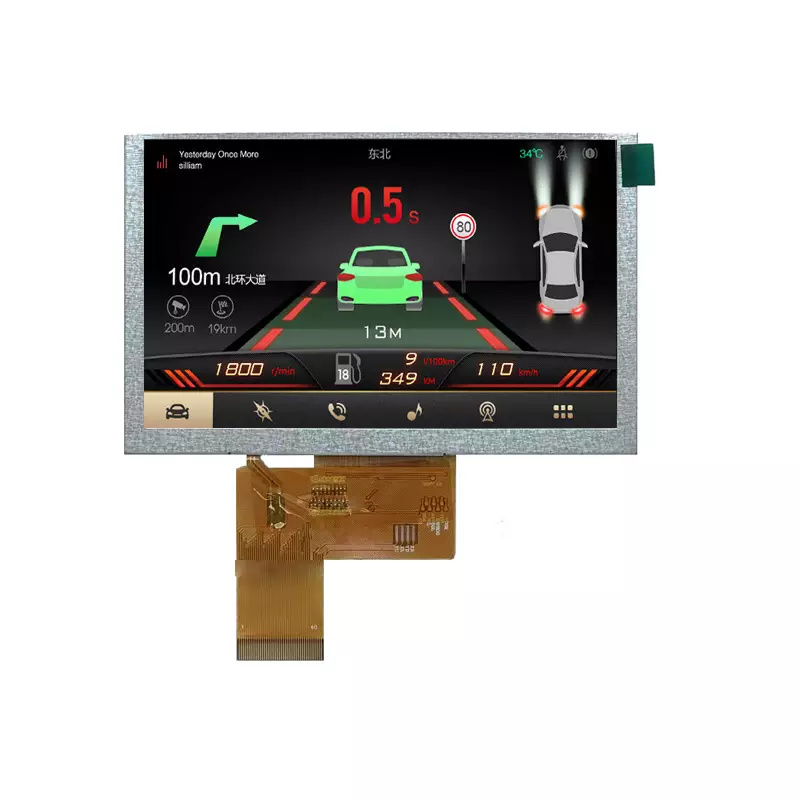
 lcd module tft display

Reduce Reflections and Enhance Clarity

Modern lcd module tft solutions address one of the most persistent challenges in display technology: how to reduce reflections and enhance clarity. When you use a tft lcd screen in bright environments, unwanted reflection can obscure content and reduce readability. Advanced anti-reflective and anti-glare film technologies, along with optical bonding, provide effective ways to reduce reflections and improve the user experience.


Anti-Reflective Coatings

You benefit from anti-reflective coatings because they use sophisticated optical engineering to minimize reflection and glare. These coatings work by manipulating light at the surface of lcd module tft displays, ensuring that more light passes through the screen and less is reflected back at your eyes. This process preserves image quality and enhances clarity, even in challenging lighting conditions.

Mechanism

Description

Optical Interference

AR coatings use optical interference to reduce mirror-like reflections while preserving image quality.

Graded-Index Layer

A graded-index layer gradually reduces the refractive index, minimizing reflections and enhancing clarity.

Moth-Eye Structure

A nanoscale surface structure that reduces photopic reflectance to less than 0.1%, improving visibility.

Surface Roughness

AG coatings diffuse specular reflections, reducing glare by redistributing reflected light.


You see the impact of these coatings in both consumer and industrial applications. For example, medical devices require clear, accurate visuals for critical decisions. Consumer electronics, such as smart appliances, benefit from improved readability in kitchens or outdoor spaces. Anti-reflective and anti-glare film solutions ensure that you experience less eye strain and better clarity, regardless of the environment.


Optical Bonding Technology

Optical bonding technology further enhances lcd module tft displays by physically attaching the cover glass to the display panel with a special adhesive. This process eliminates the air gap that typically exists between layers, which is a major source of internal reflection.


Eliminating Air Gaps

When you remove the air gap, you significantly reduce internal reflection. This leads to sharper images and improved contrast. The content on your lcd module tft display appears more vibrant and legible, even in direct sunlight.

Benefit

Description

Reduced Reflections

Optical bonding minimizes the reflection and refraction of light, enhancing visibility.

Improved Clarity

Eliminating the air gap leads to sharper, more vibrant images with better contrast.

Enhanced Visibility

Ideal for bright environments, making content clearer and more legible.


Improving Durability

Optical bonding not only helps reduce reflections but also increases the durability of your display. The adhesive layer protects the lcd module tft from dust, moisture, and physical impact. This makes it an excellent choice for industrial equipment, outdoor kiosks, and any application where reliability matters.

Benefit

Description

Reduced Glare

Optical bonding reduces glare, improving visibility in outdoor and well-lit environments.

Enhanced Contrast

The elimination of the air gap enhances contrast, making images and text appear sharper.

Improved Durability

The bonding process increases the durability of the display, protecting it from damage.


You gain better legibility, higher clarity, and longer-lasting performance from these advanced technologies. Whether you use tft lcd screens in consumer gadgets or industrial machinery, anti-reflective coatings and optical bonding provide the solutions you need for superior readability and display quality.


Tip: For the best results in high-brightness or outdoor settings, choose lcd module tft displays with both anti-reflective coatings and optical bonding. This combination delivers maximum clarity and reduces reflections for any application.


Modern lcd module tft technology delivers impressive improvements in contrast and color performance. These advancements help you achieve better visibility, sharper images, and more vibrant colors in any environment. When you select the right lcd module tft solution, you ensure your device stands out, even in challenging lighting conditions.


IPS Panel Advantages

You benefit from IPS panel technology because it provides superior viewing angles and color accuracy compared to traditional lcd module tft displays. IPS panels do not show the gray inversion effect, so colors remain consistent from every angle. This feature is essential for applications where multiple users view the screen at once or where precise color reproduction matters.

  • IPS panels maintain color integrity from various angles.

  • The arrangement of liquid crystal molecules in IPS technology allows for better clarity and color accuracy.

  • You avoid the washed-out look and color shifting seen in older tft lcd screens.

Feature

IPS Panels

Traditional TFT Panels

Viewing Angles

Up to 178°

Typically around 55°

Color Reproduction

More consistent and stable

Colors can shift and appear washed out

Gray Inversion Effect

No gray inversion effect

Exhibits gray inversion effect

You experience clear information at angles, which is crucial for both driver safety and user experience. This advantage supports eye comfort and reduces visual fatigue during extended use.


Improved Pixel Structure

The structure of each lcd module tft display plays a vital role in delivering high contrast and accurate color. Every component, from the backlight to the color filters, contributes to the overall image quality you see.

Component

Role in Image Quality

Backlight

Provides illumination for the display

Polarizing films

Control the direction of light

Glass substrates

Contain the liquid crystal material

Color filters

Create red, green, and blue sub-pixels

TFT array

Controls individual pixels

Liquid crystal layer

Alters light transmission based on electrical signals


A well-designed pixel structure ensures deeper blacks, brighter whites, and a wide color gamut. You notice images that look more lifelike and text that remains sharp, even in bright environments. Enhanced brightness makes lcd module tft solutions suitable for outdoor use, improving visibility in sunlight.

Feature

Benefit

High Contrast Ratios

Deeper blacks and brighter whites improve readability in bright environments.

Wide Color Gamut

Ensures images are vibrant and lifelike, enhancing visual feedback.

Enhanced Brightness

Makes displays suitable for outdoor environments, improving visibility in sunlight.


Dynamic Contrast Adjustment

Dynamic contrast adjustment gives you the ability to see both bright and dark areas clearly, even when lighting conditions change. This technology uses localized brightness control, so the lcd module tft adapts to your environment in real time.

  • Dynamic contrast adjustment enables localized brightness control, enhancing visibility in varying ambient light conditions.

  • The display renders both bright and dark areas effectively, which is crucial for outdoor visibility.

  • Local dimming zones in advanced backlighting technologies achieve deeper blacks and brighter highlights, improving overall display performance.

You gain a display that responds to your needs, whether you use it indoors or outdoors. These solutions help you maintain high visibility and eye comfort, making tft lcd displays a reliable choice for any application.


Environmental Robustness of TFT LCD Screens

You expect your lcd module tft to perform reliably in a range of environments. Devices often face extreme temperatures, whether in outdoor kiosks, industrial machinery, or medical equipment. Wide temperature lcd solutions ensure that your display remains clear and functional, even when conditions change rapidly. Many specialized tft lcd displays operate from -20°C to +60°C, and some modules reach up to 70°C. Noritake models extend this range from -30°C to 85°C. These wide temperature lcd solutions protect your investment and guarantee consistent performance.

Type of Display

Operating Temperature Range

Conventional LCD

-10°C to 50°C

Specialized TFT LCD

-20°C to +60°C

Some Modules

Up to 70°C

Noritake TFT Models

-30°C to 85°C


You benefit from these robust lcd module tft options in environments where temperature fluctuations could otherwise damage electronics. Wide temperature lcd solutions help you maintain eye comfort and visibility, regardless of the weather or location.


RoHS Compliance and Safety

You want your lcd module tft to meet strict safety and environmental standards. RoHS compliance plays a key role in ensuring that your device is safe for users and the environment. Manufacturers now use eco-friendly materials, replacing lead-based solder with tin-silver-copper alloys. This shift aligns with global regulations such as the EU RoHS Directive. You also see a growing demand for sustainable electronics, and RoHS compliance supports this trend.


Key Trends and Drivers

Description

Shift to Eco-Friendly Materials

Manufacturers are replacing lead-based solder with tin-silver-copper alloys.

Global Regulatory Pressure

Compliance with regulations like the EU RoHS Directive enhances safety.

Consumer Preference

Demand for sustainable electronics is supported by RoHS compliance.

The Golden Vision lcd module tft display module meets RoHS standards, so you can trust its safety and environmental robustness. You protect users and contribute to a healthier planet by choosing RoHS-compliant solutions.


Reliability in Harsh Conditions

You rely on your lcd module tft to deliver stable performance in tough environments. Reliability metrics help you evaluate how well a display will function over time. Stability ensures your device operates without crashes or freezes. Lifespan measures how long your screen remains effective. Anti-interference capabilities protect your display from electromagnetic and electrostatic disruptions. Resistance to high and low temperatures guarantees functionality in extreme conditions.

  • Stability: Your device runs smoothly without interruptions.

  • Lifespan: The screen continues to work effectively for years.

  • Anti-interference capabilities: The display withstands electromagnetic and electrostatic interference.

  • Resistance to high and low temperatures: You get reliable operation in any climate.

You gain peace of mind knowing your lcd module tft can handle demanding environments. These solutions combine durability, safety, and performance, making them ideal for industrial, medical, and consumer applications. High brightness and robust construction further enhance reliability, so you experience clear visuals and eye comfort wherever you use your device.


Eye Comfort and User Experience

You expect lcd module tft screens to deliver consistent comfort and clarity, no matter where you sit or stand. All-view angle technology in modern tft lcd displays ensures that you see uniform brightness, contrast, and color saturation from every direction. This feature eliminates the need to reposition your device, reducing strain and enhancing eye comfort. You experience natural color output and improved readability, which minimizes the factors that influence eye strain. The Golden Vision lcd module tft display integrates all-view angle technology, so you enjoy a comfortable viewing experience whether you use the device alone or share it with others.


Feature

Benefit

Consistent image quality

Maintains uniform brightness, contrast, and color saturation from various angles.

Improved color accuracy

Eliminates color shifting and loss of contrast, providing a more natural visual output.

Enhanced readability

Reduces eye strain by allowing comfortable viewing without constant adjustments.

Reduced eye strain

Provides a uniform image, minimizing the need for users to reposition their screens.

You notice less strain during long periods of use. This technology supports comfort for your eyes and helps you focus on your tasks without distraction.


Touch Panel Options

Touch panel options in lcd module tft screens transform your interaction with devices. You navigate menus, select options, and control functions with simple gestures. Capacitive and resistive touch panels offer intuitive operation, making devices accessible for everyone. Multi-touch capabilities allow you to zoom, scroll, and perform complex actions with ease. These solutions simplify operation and support accessibility features, so individuals with disabilities can use devices comfortably. You no longer need external peripherals, which streamlines your workflow and reduces strain from repetitive movements.


Advantage

Description

Intuitive Interaction

Touchscreens enable simple gestures like tapping and swiping for easy navigation.

Multi-Touch Capabilities

Allows complex actions such as pinch-to-zoom, enhancing user experience in various applications.

Accessibility Features

Supports assistive technologies, making devices usable for individuals with disabilities.

Simplified Operation

Eliminates the need for external peripherals, making devices easier to use for everyone.

You benefit from comfort and reduced strain, especially when using lcd module tft solutions in medical, industrial, or consumer environments.


Energy Efficiency

Energy efficiency plays a vital role in eye comfort and overall user experience. Efficient lcd module tft displays use advanced backlight control and blue light reduction technologies to minimize power consumption and reduce strain. You adjust brightness to suit your environment, which helps lower energy use and supports comfort for your eyes. Blue light reduction features decrease exposure to harmful wavelengths, further reducing strain and supporting long-term eye health. You find these solutions especially valuable in portable devices, where battery life and comfort matter most.

  • Blue light reduction technology lowers exposure to harmful light, decreasing strain.

  • Adaptive brightness settings help you maintain comfort and visibility in any lighting condition.

  • Efficient lcd module tft displays extend battery life and support sustainable device operation.

You experience less strain and greater comfort, whether you use your device for work, study, or leisure. Modern tft lcd displays combine all-view angle technology, touch panel options, and energy efficiency to deliver solutions that prioritize eye comfort and usability.


Choosing the Right TFT LCD Display

Selecting the best lcd module tft for your project requires careful evaluation of specifications, application needs, and cost-performance balance. You want a display that delivers reliability, clarity, and the right features for your environment. The Golden Vision 3.5 Inch IPS module demonstrates how flexibility and advanced technology can meet a wide range of requirements.


Key Specifications to Consider

You should review several key specifications before making a decision. Each factor impacts the performance and suitability of your lcd module tft for different applications. The table below outlines the most important specifications and their descriptions:

Specification

Description

Size & Resolution

Choose from various sizes and resolutions to fit compact or large devices.

Viewing Angles & Brightness

IPS or MVA technologies improve visibility; sunlight-readable options support outdoor use.

Touchscreen Requirements

Capacitive touch enables multi-touch; resistive touch works well with gloves in industrial settings.

Interface Compatibility

Ensure support for HDMI, EVE, or other interfaces for seamless integration.

Durability & Lifespan

Opt for displays designed for longevity and reliability, especially in demanding environments.


You gain the most value by matching these specifications to your project’s needs. The Golden Vision lcd module tft offers customizable options, including touch panel selection and adjustable brightness, making it suitable for both consumer and industrial devices.


Application-Based Selection

Your application determines which lcd module tft features matter most. Follow these steps to ensure you select the right display:

  1. Define your requirements:

    • Assess the usage environment. Outdoor devices need higher brightness and wide viewing angles. Indoor devices may prioritize contrast and color accuracy.

    • Identify the display content. Text, images, and videos require different resolutions and color performance.

  2. Evaluate display effects:

    • Select brightness levels that match lighting conditions. Strong light environments demand higher brightness, while dim settings benefit from enhanced contrast.

You should always align your selection with the intended use. For example, medical devices require high accuracy and reliability, while consumer products may focus on vibrant visuals and responsive touch.


Tip: The Golden Vision lcd module tft adapts to various applications, from medical equipment to smart appliances, thanks to its flexible design and robust performance.


Cost vs. Performance

Balancing cost and performance ensures you get the best value from your lcd module tft investment. Consider these points:

  • Industrial displays provide greater reliability and longer lifespan, making them ideal for harsh environments.

  • Consumer displays cost less but suit shorter product cycles and stable conditions.

  • The initial price of an industrial lcd module tft may be higher, but you benefit from lower total ownership costs due to fewer service calls and replacements.

  • Industrial screens use superior materials and robust designs, ensuring consistent performance and durability.

You should weigh the upfront investment against long-term savings and reliability. The Golden Vision module exemplifies a solution that balances advanced features with cost-effectiveness, supporting both demanding and everyday applications.


You solve visibility challenges in modern electronics by choosing lcd module tft solutions that combine sunlight-readable tft lcd, anti-reflective coatings, and high brightness. These technologies deliver clear visuals, reduce glare, and enhance comfort for users. The table below highlights how lcd module tft features improve performance:

Technology

Benefit

High Brightness Backlight

Increases display brightness for better visibility in sunlight.

Anti-Reflective Coatings

Minimizes reflection and glare, ensuring better readability.

You ensure eye comfort and reliability by selecting lcd module tft displays with robust environmental protection. Consider these factors to maximize visibility and comfort in every tft lcd display project.
If you want the best picture and bright colors, pick an oled display. Gamers and movie fans like oled because it shows dark blacks and clear pictures. If you want to save money or need a screen for outside, lcd is a better pick. Many phones, TVs, and gaming devices use oled since people enjoy bright colors and sharp images.

You will see oled in most new phones and fancy TVs, but lcd is still common for laptops and monitors.

Common Uses

Smartphones

Televisions

Gaming devices

Laptops

PC Monitors

Smartwatches

Digital Signage


Key Takeaways

  • Pick OLED if you want the best picture. It shows very dark blacks and bright colors. This makes it great for watching movies and playing games.

  • Pick LCD if you want to save money. LCD screens cost less and work well in bright places.

  • Think about how long each screen lasts. LCDs usually last longer than OLEDs. LCDs also have less chance of burn-in.

  • Think about how you will use your screen. OLED is good for art because it shows colors well. LCD is better for everyday use and seeing outside.

  • Ask yourself some important questions before you buy. Think about your budget, how you will use the screen, and if picture quality matters to you.


OLED vs LCD Overview

What Is an OLED Display?

You see an oled display in many modern devices. This type of screen uses organic materials that light up when electricity passes through them. Each pixel creates its own light, so you get deep blacks and vibrant colors. Because every pixel works on its own, oled displays show sharp images and high contrast. These screens are thin and flexible, making them popular in smartphones and high-end TVs.


What Is an LCD Display?

An lcd display works differently. It uses a backlight to shine through layers of liquid crystals. The crystals twist and block light to form images. Since the backlight always stays on, lcd displays cannot show true black. However, lcd displays can get very bright, which helps you see the screen outside or in sunlight. You find lcd displays in many laptops, monitors, and budget TVs.


How Do They Differ?

When you compare oled vs lcd, you notice some big differences. Oled displays control each pixel, so you get better picture quality and more vibrant colors. Lcd displays use a backlight, so they often look less sharp and have lower contrast. Oled displays are thinner and use less power because they do not need a backlight. Lcd displays last longer and cost less, but they may not look as good from the side.

Here is a quick comparison:

Feature

OLED Display

LCD Display

Light Source

Each pixel emits its own light

Needs a backlight

Picture Quality

Deep blacks, vibrant colors

Bright, but less accurate colors

Thickness

Thinner and more flexible

Thicker and less flexible

Viewing Angle

Wide, colors stay true

Narrower, colors may shift

Power Use

Lower, no backlight needed

Higher, always-on backlight

Cost

More expensive

More affordable

Tip: If you want the best picture quality and vibrant colors, oled displays are a great choice. If you need a screen that is bright and budget-friendly, lcd displays work well.


Picture Quality and Contrast Ratio

OLED Display: Deep Blacks and Vibrant Colors

When you look at an oled display, you notice deep blacks and vibrant colors right away. Each pixel in oled displays can turn off completely. This means you see true blacks, not just dark grays. Movie scenes with shadows or night skies look more realistic. You get superior contrast because the bright parts of the screen stand out against the dark areas.

Oled displays also show a wide range of colors. Some models, like QD-OLED, cover up to 116% of the DCI-P3 color space. This means you see more shades and richer tones. The table below shows how different oled technologies perform:

Technology

DCI-P3 Coverage

Peak White Luminance (nits)

WOLED

67%

1300

QD-OLED

116%

1000

You get excellent color accuracy with oled displays. For example, LG OLED TVs score an average color error of just 1.8 JNCD (Just Noticeable Color Difference), which means colors look very close to real life. This level of accuracy helps you enjoy movies, games, and photos as the creators intended.

Tip: If you want the best picture quality for movies or creative work, oled displays give you true blacks and superior contrast.


LCD Display: Brightness and Sunlight Visibility

LCD screens use a backlight, so they cannot turn off individual pixels. You do not get true blacks, but you do get high brightness. This makes lcd screens easier to see in bright rooms or outside in sunlight. If you use your device outdoors often, lcd can help you see the screen clearly.

LCD displays usually have a contrast ratio between 1000:1 and 3000:1. This means the brightest white is 1000 to 3000 times brighter than the darkest black the screen can show. While this is good, it does not match the infinite contrast ratios of oled. Still, lcd screens work well for office use, classrooms, or anywhere you need a bright display.

The table below shows how lcd and oled compare in color accuracy:

Metric

LG OLED TV

Samsung LCD TV

Average Color Error (JNCD)

1.8

N/A

Color Accuracy

Excellent

Good

Performance in Tests

Best

N/A


Contrast Ratio: OLED vs LCD

Contrast ratio tells you how well a screen shows the difference between the darkest and brightest parts. Oled displays have infinite contrast ratios because they can show true blacks. You see this when watching movies with dark scenes. The black parts look deep and pure, while the bright parts pop out. This gives you superior contrast and a more lifelike image.

LCD screens have a static contrast ratio, usually between 1000:1 and 3000:1. Even at high brightness, lcd cannot match the superior contrast of oled. Some lcd screens use tricks like dynamic contrast, but they still cannot reach the true blacks of oled displays.

Here is a quick comparison:

Display Type

Typical Contrast Ratio

OLED

Infinite (true blacks)

LCD

1000:1 to 3000:1 (static)

You will notice the difference most when watching movies or playing games with lots of dark and light areas. Oled gives you superior contrast and true blacks every time. If you want the best possible picture quality, oled is the clear winner.

Note: Oled displays stand out for their infinite contrast ratios and true blacks, while lcd screens offer good brightness and visibility in sunlight.


Performance and Lifespan

Response Time and Refresh Rate

If you play games or watch fast videos, you want a quick display. OLED displays change colors very fast. Each pixel switches almost right away. This means you see smooth movement and less blur. Gamers notice this during action scenes. OLED displays can have response times as low as 0.03 milliseconds. LCD screens, like IPS types, usually take between 1 and 4 milliseconds. The table below shows the difference:

Display Type

Response Time (ms)

OLED

0.03–0.1

LCD (IPS)

1–4

OLED has less input lag. This helps you react faster in games. Both types can have fast refresh rates. But OLED gives smoother motion.


Power Efficiency: OLED vs LCD

Battery life and energy use matter. OLED uses less power for dark images. It can turn off pixels to save energy. LCD screens use a backlight that is always on. Power use stays about the same for LCD, no matter what you see. OLED uses more power than LCD for bright images. The tables below show how power use changes:

Display Type

Brightness Level

Power Consumption Characteristics

OLED

Dark Images

More energy-efficient, can turn off pixels

OLED

Bright Images

Consumes more power than LCD

LCD

Any Brightness

Relatively constant power consumption regardless of image brightness

Display Type

Energy Efficiency Scenario

Description

OLED

Dark Images

Uses less power when pixels are off or dim.

OLED

Bright Images

Needs more power when many pixels are bright.

LCD

Dark Images

Not as efficient because backlight is always on.

LCD

Bright Images

More efficient since backlight works well for bright content.

You save battery on phones with OLED by using dark mode. OLED TVs also use less energy for movies with dark scenes. LCD works better in bright rooms where you need high brightness all the time.


Lifespan and Burn-In Risk

You want your screen to last a long time. LCD screens usually last between 30,000 and 60,000 hours before losing quality. OLED screens can last up to 100,000 hours. That means about 11 years if you use it 8 hours a day. Most people get 3 to 5 years of good use from OLED displays. This is because the organic parts can wear out and burn-in can happen.

Screen burn-in affects about 5% of users after two years of normal use. If you show the same image, like a logo or menu, burn-in can happen in a few months. LCD screens almost never have burn-in problems. You get a longer lifespan and do not have to worry about image retention.

Tip: If you use your screen for games, movies, or art, OLED gives you fast response and great colors. If you need a screen for work or want it to last longer, LCD is better and has less risk of burn-in.


Cost and Value

Price Comparison

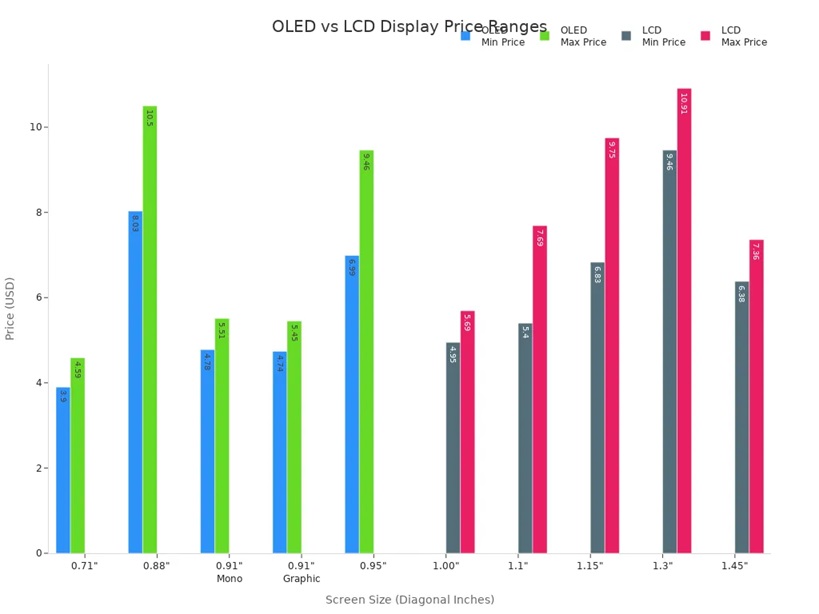
You probably want to know how much you will spend on a new screen. The price comparison between oled and lcd shows big differences. Oled screens cost more because they use advanced technology. LCD screens are more affordable and come in many sizes. You can see the price ranges for small displays in the table below:

Display Type

Diagonal Dimension

Resolution

Price Range

Monochrome 128x32 OLED

0.91"

128x32

$4.78 - $5.51

Small 128x32 Graphic OLED

0.91"

128x32

$4.74 - $5.45

Small 48x64 OLED

0.71"

48x64

$3.90 - $4.59

128x36 Color OLED

0.88"

128x36

$8.03 - $10.50

96x64 OLED Full Color

0.95"

96x64

$6.99 - $9.46

Small Backlit LCD

1.15"

128x64

$6.83 - $9.75

1.1" Graphic Transparent LCD

1.1"

128x64

$5.40 - $7.69

42x65 One Inch LCD

1.00"

42x65

$4.95 - $5.69

128x128 1.45" TFT LCD

1.45"

128x128

$6.38 - $7.36

240x240 1.3" TFT LCD

1.3"

240x240

$9.46 - $10.91


You can also look at the chart below to compare prices for different screen sizes:

Over the past five years, oled TVs have dropped in price. You can now find many models under $900. LCD TVs stay competitive, with 55-inch screens costing between $400 and $600. This price comparison helps you choose the right display for your budget.


Long-Term Value

When you think about long-term value, you need to look at more than just the price tag. Oled displays save energy when showing dark images because pixels can turn off. LCD screens use a backlight all the time, which may use less power for bright content. Repairs for oled cost more since you often need to replace the whole panel. LCD repairs are cheaper and parts are easy to find.

Aspect

OLED Displays

LCD Displays

Energy Efficiency

More efficient with dark content; pixels can turn off

May consume less power with bright content due to constant backlight

Repair Costs

Generally more expensive; often requires full panel replacement

Typically cheaper; parts are more abundant and easier to replace

Oled technology holds its value well. XDR oled screens keep about 92% of their value after one year. Standard smartphone displays keep 75-80%. Premium features like XDR oled stay valuable, even when new models come out. Resale values for AR-ready screens are 15-20% higher than regular screens. LCD technology still leads the market because it is reliable and affordable. You see lcd in many devices for work and school.

Tip: If you want a display that saves energy and keeps its value, oled is a smart choice. If you want lower repair costs and a good price, lcd works well for most needs.


Best Uses for Each Display

Gaming

When you play games, you want fast action and smooth graphics. Many pro gamers pick monitors with high refresh rates and low response times. The XL2546K monitor has a 240Hz refresh rate and a 1ms response time. OLED displays change pixels quickly. But lots of gaming monitors still use lcd because they can reach high refresh rates and cost less money. If you play games to compete, lcd monitors with 1920×1080 resolution work well.

Feature

Importance for Gamers

Refresh Rate

High

Response Time

Low

Resolution

1920×1080

Monitor Example

XL2546K (240Hz, 1ms)

Tip: Pick lcd if you want fast games and a lower price. Choose oled if you want cool visuals and deep blacks.


Creative Work

For creative work, you need sharp images and true colors. OLED displays give better contrast because each pixel can turn off by itself. This means you see sharper images and more real colors. If you do photography or graphic design, color accuracy is very important. OLED monitors are great for this. They show bright colors and do not have a halo effect.

  1. Contrast: OLED displays make images look sharper.

  2. Brightness: LCD screens are brighter overall.

  3. Viewing Angles: OLED keeps the picture clear from the side.

If you work in photography, graphic design, or content creation, and you care about color accuracy, an oled monitor is probably the best choice.


General and Office Use

You might spend many hours in front of your screen at work or school. LCD screens work best in bright rooms. They are very bright and fit office lighting. OLED works well in dark rooms and shows great blacks and picture quality.

Display Type

Best Environment

Performance Characteristics

OLED

Dimly lit rooms

Great blacks make the picture look better

LCD

Bright environments

Very bright, good for rooms with lots of light


Movies and TV

If you want a great home theater, oled displays are a good pick. They have self-emissive pixels for better picture quality. You get wide viewing angles, about 70 degrees, so everyone can see the screen clearly. OLED TVs also have less blue light and flicker, so your eyes feel better during long movies.

  • OLED displays give you the best picture quality.

  • Wide viewing angles let everyone see well in the room.

  • Less blue light and no flicker help protect your eyes.


Budget Buyers

If you want a good screen but do not want to spend a lot, lcd screens are a smart pick. They cost less and come in many sizes. LCD screens last longer and almost never get burn-in. If you just need a screen for simple tasks, lcd is a good choice. OLED costs more but gives you better visuals if you want to spend extra.

Note: LCD screens are good for most budgets and daily use. OLED displays are for people who want the best features.


Pros and Cons Summary

OLED Pros and Cons

You see many benefits when you choose an oled display. The picture looks sharp and colors stand out. You get deep blacks and wide viewing angles. The screen is thin and flexible, so it fits in many devices. Gamers enjoy faster response times with oled displays. You also notice some drawbacks. Burn-in can happen if you show the same image for a long time. The cost is higher because making oled screens takes more work. Sometimes, the screen does not get as bright as lcd.

Here is a quick table to help you compare:

Pros

Cons

Superior visual quality

Burn-in / image retention

Thin and flexible designs

High manufacturing cost

Wide viewing angles

Lower brightness

Faster response time


Tip: If you want the best picture and fast action, oled gives you a great experience. You need to watch out for burn-in and higher prices.


LCD Pros and Cons

You find lcd screens in many devices because they are reliable and bright. The images look sharp at the native resolution. You get flat screens with a small footprint. Lcd uses less electricity and works well in bright rooms. You do not worry about burn-in. You also see some downsides. The viewing angle is limited, so colors can change when you move. Lcd has trouble showing deep blacks and high contrast. Sometimes, you notice bad pixels or uneven lighting. Motion can blur if the response time is slow.

Here is a list to help you see the main points:

  • Pros:

    • Sharp images at native resolution

    • No geometric distortion

    • High brightness for sunlight visibility

    • Flat and thin screens

    • Low electricity use

  • Cons:

    • Fixed resolution can cause image problems when rescaled

    • Limited viewing angles affect color and brightness

    • Lower contrast and trouble with deep blacks

    • Possible bad pixels and uneven screen lighting

    • Motion blur with slow response times

Note: Lcd works well for everyday use and bright rooms. You get a good price and long lifespan, but you may see less contrast and color accuracy.


How to Choose

Matching Needs and Preferences

You want a screen that fits your lifestyle and budget. Start by thinking about what matters most to you. If you love movies or games, you may want an oled display for its deep blacks and vibrant colors. If you use your device outside or need something affordable, lcd might suit you better. You should also consider how long you plan to use your screen and how much energy it uses.

Here is a table to help you compare important criteria:

Criteria

OLED Displays

LCD Displays

Picture Quality

Vibrant colors, deep blacks

May lose color over time, less contrast

Lifespan

Can degrade, especially blue pixels

Lasts longer, less risk of burn-in

Energy Efficiency

Saves power with dark images

Varies with content

Cost

Higher price, advanced technology

Lower price, easier to find

Color Accuracy

Very accurate, true to life

Not as vibrant

Contrast Ratio

Superior, makes images pop

Lower, less dramatic

You should pick lcd if you want lower cost and good energy efficiency. Choose oled if you want the best colors and contrast. Think about how long you want your screen to last. Oled may fade over time, while lcd stays strong.

Tip: Match your choice to your main use. If you want a screen for creative work or movies, oled displays give you the best experience. For everyday tasks or outdoor use, lcd works well.


Key Questions to Ask

Before you buy, ask yourself a few simple questions. These will help you decide which display fits your needs.

  • What is an oled?

  • Should you pick lcd, TFT, or oled?

  • Can you use your display in direct sunlight?

  • How important is picture quality for you?

  • Do you care about energy savings?

  • Will you use your screen for many years?

  • Is your budget limited?

You should answer these questions based on your daily habits. If you want a screen that looks great and lasts, think about how you use your device. Oled gives you amazing visuals, but lcd offers durability and value.

Note: Your needs and preferences guide your choice. Take time to compare features and ask questions before you decide.


If you want deep blacks and bright colors, pick oled. Oled screens are thin and light. Movie lovers, gamers, and artists like oled best. If you want a screen that lasts longer and costs less, lcd is better. Lcd works well for daily use and saving money. Look at the table below to see the main features:

Feature

OLED

LCD

Visual Quality

Superior

Good

Lifespan

Shorter

Longer

Cost

Higher

Lower

Think about what you use your screen for, your budget, and how long you want it to last.


FAQ

What is screen burn-in, and should you worry about it with OLED?

Screen burn-in happens when a static image stays on your OLED screen for a long time. You may see a faint shadow left behind. You can avoid burn-in by changing what you display often.

Can you use an LCD or OLED display outside?

LCD screens work better outside because they get brighter. You see the screen clearly in sunlight. OLED screens may look dim outdoors, especially in direct sunlight.

Which display lasts longer, OLED or LCD?

LCD displays usually last longer. You get more years of use before the screen fades. OLED screens can lose brightness over time, especially the blue pixels.

Are OLED displays better for your eyes?

OLED screens show less blue light and flicker. You may feel less eye strain during long use. You still need to take breaks to protect your eyes.


Imagine you walk into a store and see many organic light-emitting diode screens. You want the best screen to watch things on, but picking the right portable OLED monitor can be hard. Most people care a lot about how good the screen looks. In fact, 78% of buyers say it is the most important thing when buying devices that cost more than $800. Many people make mistakes like choosing the wrong size, not thinking about the light in the room, or forgetting about how the screen looks from different angles. If you want a display that fits your space and what you need, learning about organic light-emitting diodes and knowing.


Define Your OLED Needs

Main Use Cases

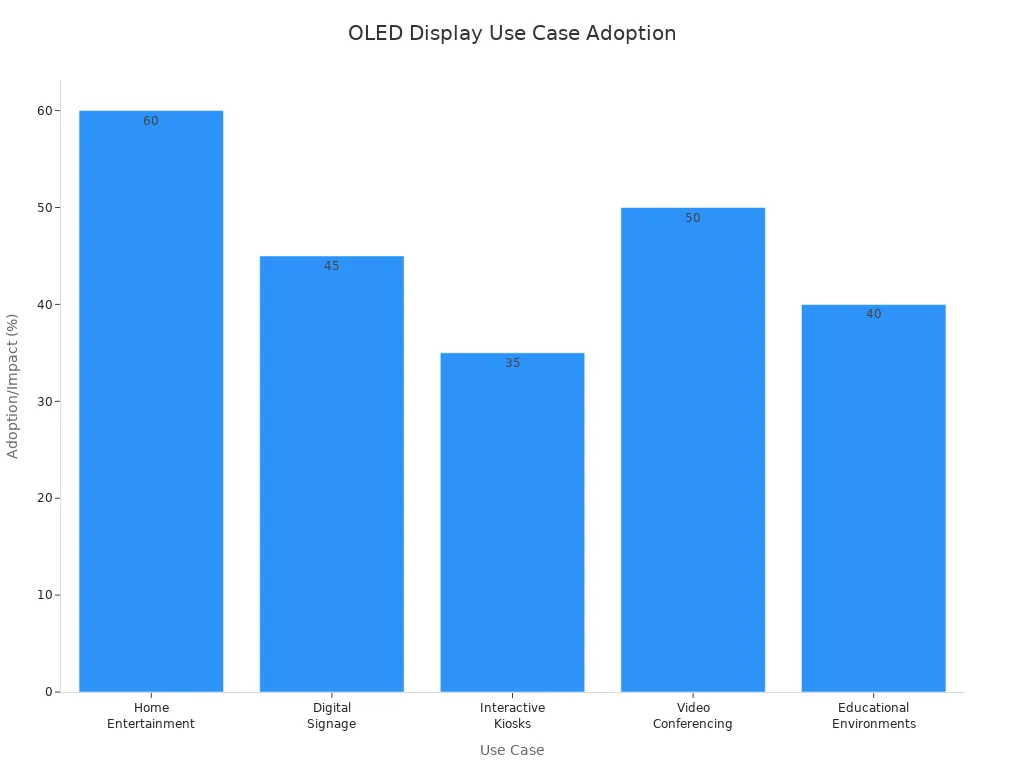
First, think about how you will use your OLED with DC dimming support. People buy these displays for different reasons. Some want to watch movies at home. Others use them for work, playing games, or teaching. The table below shows why people use OLED displays and how popular each use is:

Use Case

Description

Adoption Rate/Impact

Home Entertainment & Personal Use

OLED TVs make movies look better with great colors and contrast.

60% of people who buy expensive TVs pick OLED.

Digital Signage & Commercial Displays

These are good for busy places because the pictures look bright.

OLED signs went up by 45% in two years.

Interactive Kiosks & Public Info Systems

These are used for touch screens in public places.

35% more people use these each year.

Video Conferencing & Corporate Communications

OLED makes online meetings look clear and colorful.

50% more conference rooms use OLED now.

Educational & Training Environments

OLED helps with lessons and showing hard ideas.

OLED use in schools may grow by 40% by 2025.

Bar chart showing adoption rates of OLED displays across five consumer electronics use cases

Space and Environment

Look at your room before you buy a display. Measure the spot where you want to put your OLED display. Check how bright your room is. If your room is very bright, you need a display that is brighter. For public places, pick a display that does not show glare or fingerprints. Think about how many people will watch at the same time. Wide viewing angles help everyone see the screen well.


Feature Priorities

Pick the OLED display features that fit your needs. Most people care about how good the screen looks, but other things are important too. The table below shows what buyers want most:

Feature

Description

Display Quality

People want bright colors, dark blacks, and strong contrast from OLED.

Innovative Form Factors

Some like foldable, curved, or thin screens for style and use.

Sustainability

Many want displays made in ways that are good for the planet.

Durability

People like screens that bend and do not break easily.

Advanced Features

Some want things like fingerprint sensors and fast screen changes.


Decide which features are most important to you. This will help you pick the best OLED display for your life.


Key OLED Display Features

Size and Resolution

Think about the size and resolution before you buy an OLED display. Size means how big the screen is. Resolution tells you how many tiny dots, called pixels, are on the screen. More pixels make pictures look sharper and clearer. If you sit close to your screen, you need a high resolution. This stops you from seeing the little dots. This is important for things like editing photos or watching movies in 4K.


Here is a table that shows some common OLED display sizes and resolutions:

Size (inches)

Resolution (pixels)

Contrast Ratio

Color Gamut Coverage

21.6

3840 x 2160 (4K)

1,000,000:1

80% BT.2020

54.3 x 30.6 cm

1920 x 1080 (Full HD)

N/A

N/A

  • More pixels make images look sharper.

  • How far you sit changes how clear the picture looks.

  • A high PPI screen looks better when you are close.

OLED displays can show true black and many colors. These things make movies, games, and work look great.


Panel Type (WRGB vs RGB)

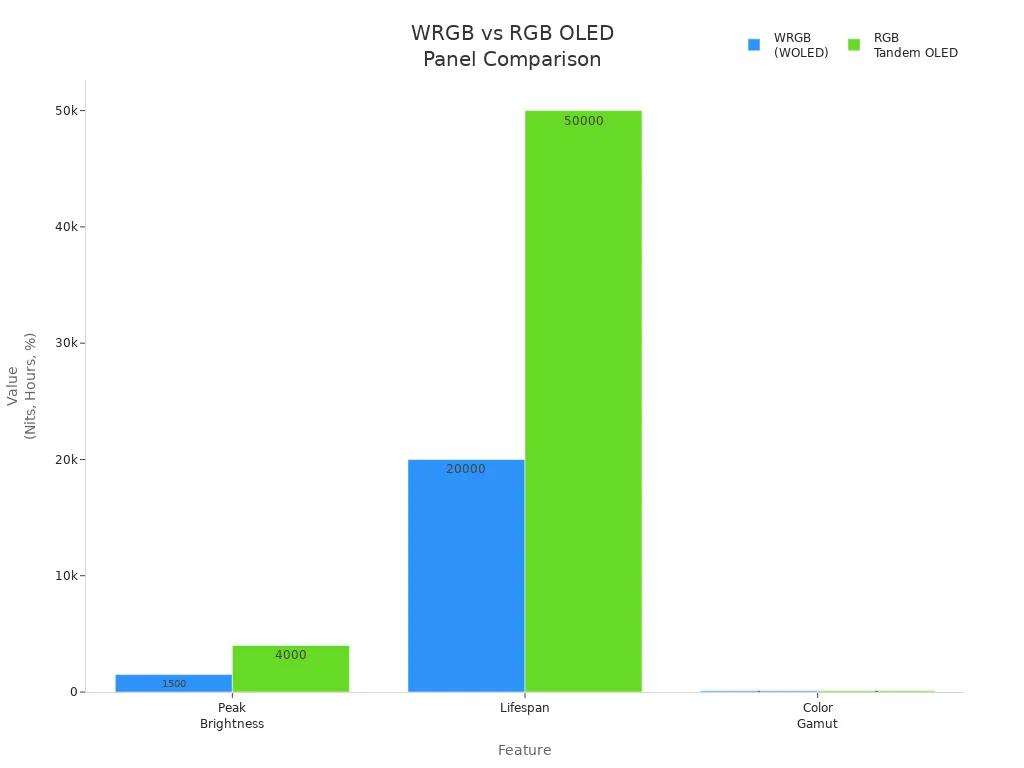
There are two main types of OLED panels: WRGB and RGB OLED. Each type changes how bright, colorful, and long-lasting the screen is.

Feature

WRGB (WOLED)

RGB Tandem OLED

Peak Brightness

1,500 Nits

4,000 Nits

Lifespan

20,000 hours

50,000 hours

Color Gamut

98% (DCI-P3)

99.8% (DCI-P3)

Bar chart comparing peak brightness, lifespan, and color gamut of WRGB and RGB OLED panels

RGB OLED panels are brighter and last longer. They also show colors a little better. WRGB panels are still very good and are used in big TVs. Pick the panel type that fits what you need for brightness and color.


Brightness and Viewing Angles

Brightness is important if your room is bright. OLED displays are usually 800 to 1,000 nits bright. This is good for most homes. QLED displays can be even brighter, up to 2,000 nits. If you want to use your screen in sunlight, you may need a brighter one.

  • OLED screens keep colors and pictures looking good from the side.

  • Each pixel lights up by itself, so colors stay the same.

  • LCD screens can lose color and look worse at sharp angles, but OLEDs do not.

With OLED, everyone in the room sees the same picture, even from the side.


Color Accuracy

Color accuracy means the colors on your screen look real. OLED displays are known for showing colors very well. You can check color accuracy with a number called ΔE00. Lower numbers mean the colors are more correct.

ΔE00

Perception

< 1.0

Not perceptible by human eyes

1–2

Perceptible through close observation

3–10

Perceptible at a glance


If you work with photos or videos, you need a screen with a low ΔE00. This makes sure your colors look right and professional.


Touch Functionality

Touch functionality lets you use your OLED display by touching it. You can tap, swipe, or draw on the screen. This is helpful for designers, teachers, and gamers. It helps you work faster and makes games more fun. OLED screens react quickly, so your touches feel smooth.

Tip: If you want to use your screen for design or games, pick one with touch support.


Connectivity and Compatibility

You need to connect your OLED display to other things. New displays have many ways to connect:

Connectivity Option

Description

Compatible Devices

I2C

Common interface for microcontrollers

Arduino, microcontroller platforms

Qwiic Connectors

Easy cable connection for I2C devices

Arduino, other I2C devices

SPI

Less common, but available on some displays

Some microcontrollers

UART

Serial port connection, rare but possible

Arduino via serial port


Make sure your display works with your computer, game system, or microcontroller. This helps you avoid problems later.


Durability and Build Quality

Durability means your OLED display can handle being used every day. Look for displays that meet rules like ISO 16750 for heat and shaking, or SAE J3168 for seeing the screen in different lights. Some displays also meet car safety rules.

Standard/Certification

Description

ISO 16750

Tests for temperature, humidity, and vibration

SAE J3168

Checks optical performance and readability

ECE Regulation No. 21

Ensures impact resistance and safety

IATF 16949

Quality management for automotive displays


A strong display with good certifications will last longer and work well in many places.


When you know about these features, you can pick an OLED display that fits what you need. You will get great pictures, true colors, and a screen you can trust.


Comparing OLED Models and Brands


Reading Specs and Reviews

When you look at OLED displays, start with the specs. Check the size, resolution, brightness, and refresh rate. These things show how the display will work in your room. You should also read reviews from trusted websites. Some good places for reviews and facts are:

  • RTINGS.com: This site has detailed reviews and compares OLED TVs and monitors. You can learn about picture quality and input lag.

  • OLED-Info.com: This site explains OLED technology and gives specs for many displays.

Reading specs and reviews helps you know what to expect before you buy.


Warranty and Support

Warranty and support are important when you buy OLED TVs or monitors. Brands give different warranty times and rules for burn-in. This can change how happy you are with your display. Check the table below to see some choices:

Brand

Model

Warranty Period

Burn-in Policy

ASUS

PG32UCDM

36 months

Covered under warranty

ASUS

Other OLED models

24 months

Not specified

  • Good support helps you fix problems fast.

  • A strong warranty and service are important for business use.

Tip: Always read the warranty rules before you buy. This keeps your money safe if something breaks.


OLED TVs vs Monitors

You should know how OLED TVs and monitors are different. The table below shows how they compare:

Feature

OLED Monitors

OLED TVs

Size

27-32 inches

55 inches and up

Resolution

4K or 1440p

4K is common

Intended Use

Gaming, content creation

General viewing, movies, gaming

Viewing Distance

Close

Farther away

Refresh Rate

Up to 240Hz

Lower refresh rates

OLED monitors show deep blacks and bright colors. They are good for gaming, design, and photos. OLED TVs are better for watching movies in big rooms. Both use OLED technology for great color and contrast, but they are best for different things.


Budget and Value

Balancing Price and Features

You want the best screen for your money. Many people look for high-quality screens, but they also care about price. You should think about what matters most to you. Some people want the newest technology. Others want a screen that lasts a long time. The table below shows what buyers think about when they choose an oled display:

Factor

Description

Display Quality

People want screens that look great and show clear images.

Technological Advancements

New features and improvements attract buyers.

Decreasing Costs

Lower prices make oled displays easier to buy.

Long-term Value

Energy savings and durability help you save money over time.


You can use this table to help you decide what is most important for your needs.


Finding the Best Value

You do not need to buy the most expensive model to get a good oled display. Look for a screen that gives you the features you want at a price you can afford. You can compare different models and brands. Check for things like warranty, support, and extra features. Sometimes, a less expensive model has everything you need.

Tip: Make a list of your top three must-have features. Use this list when you compare displays. This helps you focus on value, not just price.


Timing Your Purchase

You can save money if you buy at the right time. Stores offer big sales during certain months and events. Here are some of the best times to buy an oled display:

  • Black Friday and Cyber Monday: You can find deep discounts on many brands and sizes.

  • Holiday weekends: Stores have special deals and promotions.

  • Amazon Prime Day: Online stores offer exclusive savings.

  • Spring season: Prices drop on older models when new ones come out.

  • Late January to early February: You can find clearance sales after the holidays.

If you wait for these times, you may get a better deal on the oled display you want.


Common OLED Buying Mistakes

Ignoring Compatibility

You might get excited about a new oled, but forget to check if it works well with your devices. Many people run into problems after buying. Some common issues include:

  • Text may look blurry or unclear, especially in Windows.

  • You might see color fringing, which creates colored outlines around letters.

  • Unusual pixel layouts can cause text to look misaligned.

Always check if the oled matches your computer or system before you buy. This step saves you time and frustration later.


Overlooking Durability

You want your oled to last, but not all displays have the same lifespan. QLED and LCD displays often last much longer than oled screens. Burn-in is a real concern for oled users. This happens when images stay on the screen too long and leave marks. QLED technology stands out for its longer life and better durability. Take a look at the table below to see how long each type can last:

Display Type

Lifespan (Hours)

OLED

5,000

LCD

60,000

QLED

Not specified


If you plan to use your display every day, think about how long it will last.


Focusing Only on Specs

You may want the highest numbers, but specs do not tell the whole story. When you focus only on technical details, you can miss important drawbacks:

  1. Oled screens have a shorter lifetime, especially blue oled, which lasts about 1.6 years.

  2. They cost more than LCD displays.

  3. Water can damage them easily.

  4. They do not work as well in bright sunlight.

  5. The screen can get dimmer over time.

  6. Fewer models are available in stores.

Tip: Look beyond the numbers. Think about how you will use your oled and where you will put it.


Skipping After-Sales Support

After-sales support matters more than you might think. Good support helps you fix problems fast and keeps you happy with your purchase. The table below shows why support is important:

Evidence Type

Description

Customer Spending

Customers with great support spend 67% more with a brand.

Customer Loyalty

Fast, helpful support builds trust and keeps you coming back.

Brand Advocacy

Happy customers tell others, which helps the brand grow.


If you skip checking support options, you might regret it later. Always look for brands with strong customer service.


Picking the right OLED monitor for MacBook Pro means you need to think about what is important for your room and what you want. Use this table to help you remember the main things to check:

Key Considerations

Description

Ambient Light Levels

OLED works best in rooms with controlled lighting.

Content Composition

Moving images look best; static images can cause wear.

Viewing Distance

Sit close or mid-range for sharp details.

Panel Handling and Mounting

Handle and mount your display with care for long life.


You should also look at these things before you buy:

  • How good the picture and colors look

  • The design and how it fits your style

  • How much energy it uses

  • If it might get burn-in or how long it lasts

  • The price and if it is worth it

  • How OLED is different from other screens

When you pick a display that fits what you really need, you will not be disappointed. You will enjoy using your screen every day. The best OLED is the one that makes you happy and gives you a great time.

To enhance connection efficiency and maintenance convenience for industrial equipment, WAIN officially launches the M15 Quick-Connect Series. This series is designed to address major challenges in on-site installation and long-term maintenance. Its innovative structure is reflected in two core design highlights:


Core Design Highlights

Rapid Locking Mechanism for Higher Installation Efficiency

The connector housing adopts a direct-push quick-connect mechanism. During mating, no manual twisting of the coupling nut is required—simply push to engage, and it locks automatically. This significantly shortens installation time and reduces the difficulty of operating in tight or restricted spaces.

Detachable Contacts for Simplified Maintenance

The contacts use cold-crimp technology and are designed to be separable from the insert. After crimping the cable, the contact can be snapped directly into the side of the contact carrier—quick and intuitive. During maintenance, individual damaged contacts can be replaced without removing the entire connector, offering a more economical and flexible service solution.


Key Features & Advantages


1

Stable Electrical Performance

  Rated  at 63V / 5A, suitable for general industrial applications.

2

Reliable Connection Quality

  Cold-crimped contacts ensure stable, robust performance across diverse industrial environments.

3

Flexible Model Options

  Available in multiple configurations—including assembly-type (panel-mount compatible) and flange   versions (front/rear panel mounting)—to support various installation needs.

4

Multiple Pin-Count Options

  Offered in 9-pin, 12-pin, and 15-pin configurations to meet different signal and power requirements.


Typical Application Scenarios


◆ Industrial automation equipment (e.g., servo motors, robotic arms)
◆ Control systems requiring fast connection and easy maintenance
◆ Modular machine systems


The WAIN M15 Quick-Connect Series delivers a more efficient connectivity solution for both equipment manufacturing and on-site servicing through its optimized structural design.

For more information, please visit the WAIN official website (www.wainelectric.com) or contact us directly.


·END·

WAIN is not only manufacturing, but also creating!

Any questions and ideas related to industrial connectors,

we welcome to discuss with you.

In the fast-paced world of electronics, where technologies can become obsolete overnight, longevity and adaptability are not just virtues—they are the hallmarks of a true industry leader. For three decades, Goldenvision has stood as a testament to this principle, evolving from a specialist in monochrome LCDs to a pioneering force in advanced display solutions like TFT, Serial Port, and Knob Screen displays. Our journey is a story of relentless innovation, deep-rooted expertise, and an unwavering commitment to quality.
 
 
As an experienced LCD supplier, we have not just witnessed the evolution of display technology; we have actively shaped it.
 
 
Our Foundation: Mastering Monochrome LCDs
 
Our story began 30 years ago with a focus on a then-revolutionary technology: monochrome LCDs. This foundational period was crucial. It was in these early days that we built our core competencies in:
 
 
Precision Manufacturing: Cultivating the expertise to produce incredibly reliable and energy-efficient screens.
 
 
Rigorous Quality Control: Implementing testing protocols that ensured every display met the highest standards of performance, even in demanding environments.
 
 
Deep Customer Understanding: Learning the diverse needs of industries from industrial instrumentation to consumer devices, teaching us to listen and adapt.
 
 
This deep immersion in the fundamentals of liquid crystal technology gave us an engineering-first perspective that remains the bedrock of everything we do today. It established our reputation as a trusted LCD manufacturer.
 
 
The Strategic Shift: Embracing the Color Revolution
 
As the market demanded richer visuals and more interactive user experiences, Goldenvision made a strategic decision to lead, not follow. We invested heavily in the transition to Thin-Film Transistor (TFT) technology. This was more than just adding color; it was a complete overhaul of our capabilities.
 
 
Our engineers mastered the complexities of higher resolutions, wider color gamuts, and faster response times. We understood that to be a true experienced LCD supplier, we needed to offer a bridge for our existing clients to upgrade their products while attracting new innovators seeking state-of-the-art displays.
 
 
Goldenvision Today: Pioneering Customized HMI Solutions
 
Building on our 30-year legacy, we now channel our expertise into the next generation of Human-Machine Interface (HMI) solutions. Our focus is on providing intelligent, customizable, and easy-to-integrate displays that empower your products.
 
 
Our modern product portfolio includes:
 
 
Serial Port Displays (UART TFT): Simplifying your design process with displays that are easy to interface, reducing
development time and cost. They are the perfect upgrade path from simpler monochrome screens.
 
 
Knob Screen Displays: Combining the tactile, precise feedback of a physical rotary encoder with a high-resolution TFT display. This innovative solution offers a superior user experience in applications where gloves are used, or where menu diving is common.
 
 
Custom TFT Solutions: Leveraging our manufacturing prowess to deliver tailored displays in terms of size, brightness, touch technology, and operating temperature range.
 
 
Why Partner with a Manufacturer with History?
 
In a market filled with new entrants, choosing Goldenvision means partnering with stability and proven expertise. Our 30-year history is your assurance of:
 
 
Proven Reliability: Our processes are refined by decades of experience, resulting in exceptionally low failure rates.
 
Engineering Partnership: We offer more than just products; we provide technical support and solutions based on a vast repository of accumulated knowledge.
 
 
Supply Chain Stability: Our long-standing relationships with material suppliers ensure consistent quality and dependable delivery.
 
 
Looking Forward: The Next 30 Years of Innovation
 
The display technology evolution is far from over. As we look to the future, Gvlcd is committed to investing in R&D for emerging technologies, from higher-efficiency displays to even more intuitive user interfaces. Our legacy is not a monument to the past, but a launchpad for the future.


In the high-stakes world of healthcare, every component of a medical device must meet the highest standards of performance, reliability, and safety. At the core of many of these devices—from patient monitors to surgical instruments—lies a critical interface: the medical TFT LCD display.


These are not your average screens. Medical-grade TFT (Thin-Film Transistor) LCDs are engineered specifically to support clinical decisions, enhance patient care, and withstand the demanding hospital environment. Let's explore the key advantages that make them indispensable in modern medicine.


1. Uncompromising Image Quality and Clarity

Accurate diagnosis and treatment depend on visual precision. Medical TFT LCDs deliver:


High Resolution and Pixel Density: They provide sharp, detailed images crucial for interpreting X-rays, MRI scans, and CT scans, where missing a minute detail can have significant consequences.


Excellent Color Accuracy and Consistency: Medical displays offer superior grayscale performance and color fidelity. This is vital for distinguishing subtle tissue variations in ultrasound or digital pathology. Unlike consumer panels, they are calibrated to maintain this accuracy over time.


High Brightness: With brightness levels often exceeding 500 to 1000 nits, these displays remain clearly visible in various lighting conditions, including brightly lit operating rooms.


2. Superior Reliability and Longevity

Medical devices are often in continuous operation. Downtime is not an option.


Extended Lifespan: While consumer displays may last 10,000 hours, medical-grade TFT LCDs are built for 24/7 use, with backlights rated for 50,000 to 100,000 hours or more. This ensures years of reliable service without failure.


Robust Construction: They use high-quality components and reinforced designs to resist the wear and tear of a clinical environment, including potential bumps and vibrations.


3. Designed for Demanding Environments

Hospitals and clinics are unique workplaces. Medical TFTs are built to handle their challenges.


Wide Operating Temperature Range: They perform flawlessly in cold storage rooms or warm operating theaters, with a typical range of -10°C to 60°C or wider.


Durability and Safety: Many medical TFTs feature optical bonding. This process laminates the cover glass directly to the LCD, which:


Reduces glare and reflections.


Enhances contrast and sunlight readability.


Makes the screen more durable and resistant to condensation, a critical feature in sterile environments.


4. Enhanced Hygiene and Infection Control

Infection control is paramount in healthcare settings.


Sealed Design: Medical TFT displays are designed with flat, seamless fronts that eliminate gaps where dirt, fluids, and bacteria can accumulate.


Chemical Resistance: The cover glass is engineered to withstand frequent cleaning with harsh disinfectants and cleaning agents without degrading or clouding.


5. Critical Compliance and Safety Standards

Consumer displays do not meet the rigorous requirements for medical equipment. Medical TFT LCDs are specifically designed and certified to comply with international standards, such as:


IEC 60601-1: The benchmark for safety and essential performance of medical electrical equipment.


EMI/EMC Shielding: They are engineered to minimize electromagnetic interference, ensuring they do not disrupt other sensitive life-saving equipment in the vicinity.


Key Application Scenarios for Medical TFT LCD Displays

The advantages of these displays shine across the entire healthcare spectrum:


Patient Monitoring Systems: Vital for displaying real-time, clear, and unambiguous patient data (heart rate, blood pressure, SpO2) at the nurse's station or bedside.


Diagnostic Imaging Displays: The gold standard for PACS (Picture Archiving and Communication System) workstations, radiologists rely on their precision for mammography, radiography, and other imaging modalities.


Surgical and Intervention Tools: Used in surgical displays, anesthesia workstations, and minimally invasive surgical systems, providing surgeons with a true-to-life view of the procedure.


Medical Carts and Point-of-Care Devices: Their durability and clear visibility make them ideal for mobile ultrasound systems and portable diagnostic devices that are wheeled between rooms.


Veterinary and Dental Equipment: Bringing the same benefits of clarity and reliability to animal healthcare and dental practices.


Conclusion: More Than Just a Screen

A medical TFT LCD display is a mission-critical component. It is the vital link between complex medical data and the clinician who uses it to make life-saving decisions. By offering unparalleled image quality, rugged reliability, and compliance with strict safety standards, these specialized displays are not just an advantage—they are a fundamental requirement for advancing modern patient care.


Are you designing or sourcing components for a medical device? Partner with a supplier who understands the critical nature of these components. [Contact Gvlcd today to find the right medical-grade display for your application]. 


Since 1995, Golden Vision has been a trusted manufacturer of premium rotary knob display solutions. Explore how our knob screens enhance smart home appliances with intuitive, reliable control.

For nearly three decades, since our founding in 1995, Golden Vision has been at the forefront of human-machine interface (HMI) innovation. We have witnessed trends come and go, but one principle has remained constant: the need for controls that are both intelligently designed and utterly reliable. This philosophy is perfectly embodied in one of our flagship technologies - the rotary knob with an integrated display.

This sophisticated component is revolutionizing user interaction in the modern smart home. Let's explore why this interface has become a cornerstone of premium appliance design and how our decades of experience make Golden Vision your ideal manufacturing partner.


rotary knob display


The Evolution of Appliance Control: From Analog to Intelligent

The simple rotary knob is a classic interface that users have trusted for generations. Its tactile, intuitive nature is irreplaceable. At Golden Vision, we asked a question: "How can we preserve this intuitive physical interaction while adding the power of digital intelligence?"

The answer is our rotary knob with display. This hybrid interface combines a high-precision encoding knob with a vibrant, integrated TFT or OLED screen. It allows users to scroll through menus, adjust settings, and see real-time feedback through a single, elegant component. It’s the perfect fusion of tactile satisfaction and digital clarity.

Why the Rotary Knob with Display is Dominating Smart Appliance Design


1. Unmatched Intuitive Usability

In a world of complex touchscreen menus, the physical knob is a welcome respite. It offers:


Tactile Feedback: Users can make adjustments by feel, without staring at the interface.


Muscle Memory: Turning a dial is a natural, learned behavior, making it accessible for all users.


Contextual Control: The knob's function adapts dynamically. In an oven, it controls temperature; in a washer, it selects cycles, with the display always showing relevant data.


2. A Premium and Streamlined Aesthetic

Our knob screens help appliance designers create clean, minimalist, and high-end control panels. By replacing multiple buttons and a separate screen, it consolidates functionality into a single, sophisticated centerpiece that elevates the entire product's design language.


3. Enhanced Safety and Hygiene

Glove-Friendly Operation: Unlike capacitive touchscreens, our knob screens can be operated with wet hands or while wearing oven mitts—a critical safety feature in kitchens.

Reduced Contamination: The reduced need to touch a large screen minimizes smudges, fingerprints, and the spread of germs, supporting easier cleaning and maintenance.


4. The Perfect Bridge for the Smart Home

This interface seamlessly connects the physical and digital worlds of your appliance. The knob provides the satisfying physical interaction, while the digital display connects the user to smart features, showing:


Wi-Fi connectivity status

Notifications for completed cycles

Step-by-step recipe guides from a connected app


Golden Vision Knob Screens in Action: Smart Appliance Scenarios

Our rotary knob with display components are engineered to excel in specific, high-value applications:

Smart Ovens and Ranges: Imagine turning the knob to scroll through digital recipes. The integrated display shows a picture of the dish, the preheat temperature, and the timer—all from one central, intuitive control. Our robust components, built for high-temperature environments, ensure longevity and reliability.


Washing Machines and Dryers: Users can effortlessly scroll through dozens of specialized cycles. The display instantly updates to show duration, spin speed, and temperature for each selection. With a lifespan designed for thousands of cycles, Golden Vision knob screens are built to last.


Induction Cooktops: A single, elegant knob can control power levels for a specific burner, with the display showing the exact wattage or temperature setting, providing precise culinary control.


Dishwashers and Coffee Makers: Select wash cycles or brew settings with tactile confidence, while the display provides clear confirmation and status updates, like remaining time or current cycle stage.

Why Partner with Golden Vision? Our Legacy of Reliability Since 1995

Choosing a component supplier is about more than just the product; it's about the partnership. When you partner with Golden Vision, you gain the advantage of nearly 30 years of experience.

Proven Expertise: Since 1995, we have refined our manufacturing processes and quality control to deliver components you can rely on for your most demanding projects.


Customization and Support: We work closely with our clients to develop custom rotary knob with display solutions that meet their exact aesthetic, functional, and branding requirements.


Quality You Can Trust: Our commitment to using high-grade materials and rigorous testing protocols ensures that every knob screen we produce meets our legacy of reliability, helping you build appliances that stand the test of time.

Conclusion: Build a Smarter, More Intuitive Future with Us

The rotary knob with display is more than a trend; it's the future of intuitive appliance control. It reduces complexity, enhances safety, and delivers a premium user experience that truly makes a smart appliance feel intelligent and easy to use.

As a reliable knob screen manufacturer since 1995, Golden Vision has the experience, technical expertise, and commitment to quality to be your trusted partner in bringing this exceptional technology to market.

Ready to integrate a reliable, intuitive interface into your next-generation appliances? [Contact Golden Vision today to discuss your project and request a sample].