Breakthrough in Laser Marking Technology


RFH D9 Series UV Laser for Capacitor Cap Engraving


In the field of laser technology, the RFH D9 Series 5W UV laser has shown exceptional performance when used for engraving texts on capacitor caps. This breakthrough technology has surpassed traditional craft barriers by incorporating a proprietary embedded laser power supply control system. Not only does it provide a stable power supply, but it also integrates an intelligent control system, simplifying operation procedures and enhancing production efficiency.


The RFH D9 Series UV laser is designed to meet the demands of precision engraving applications. By utilizing cutting-edge technology, this laser device ensures high-quality engraving results while offering user-friendly features. The embedded laser power supply control system guarantees a consistent power supply, essential for achieving precise and uniform engraving on capacitor caps.


One of the key advantages of the RFH D9 Series UV laser is its intelligent control system. This system streamlines the operation process, making it more efficient and user-friendly. Operators can easily navigate through the control interface, adjust settings accurately, and monitor the engraving process in real-time. This level of automation not only saves time but also reduces the margin of error, resulting in improved overall productivity.


Furthermore, the RFH D9 Series UV laser stands out for its versatility and adaptability. Whether it is engraving intricate designs, serial numbers, or barcodes on capacitor caps, this laser device delivers consistent and reliable performance. Its advanced features and superior capabilities make it a valuable tool for various industrial applications that require precise and intricate engraving.


In conclusion, the RFH D9 Series 5W UV laser represents a significant advancement in laser marking technology, especially for engraving texts on capacitor caps. With its innovative design, stable power supply, intelligent control system, and high performance, this laser device offers unparalleled efficiency and accuracy in engraving operations. As businesses seek to optimize their production processes and enhance product quality, the RFH D9 Series UV laser proves to be a reliable and cutting-edge solution.


RFH 10W UV Laser Paint Stripping Solution


Leading the Way in Precision and Efficiency


When it comes to precision and efficiency in paint stripping, the RFH 10W UV laser solution stands out with a range of distinct advantages. This cutting-edge technology offers unparalleled benefits that set it apart from traditional methods. Let's delve into what makes the RFH 10W UV laser system the go-to choice for industries seeking precision and quality.


Leading Precision:The RFH 10W UV laser boasts a laser beam diameter that can be precisely controlled up to ±0.02mm, enabling the highest resolution in pattern and text processing. This exceptional precision ensures meticulous detailing and accuracy in paint stripping applications, setting a new standard for quality results.


Controllable Depth:By fine-tuning the laser power and scanning speed, users can achieve precise control over the depth of paint removal. This adaptability allows for efficient stripping across various coating thicknesses, catering to diverse project requirements with ease and accuracy.


Substrate Protection:The UV laser's energy is primarily absorbed by the coating, resulting in minimal damage to the underlying substrate, such as stainless steel. This non-invasive approach ensures that the integrity of the base material remains intact, preserving its structural quality and aesthetics.


Smooth Edges: Post-paint-stripping, the edges exhibit a smooth finish without any burrs, showcasing superior craftsmanship and attention to detail. The RFH 10W UV laser system delivers a flawless edge quality that reflects precision and finesse in every application.


Environmentally Friendly: Embracing the principles of modern manufacturing, the RFH 10W UV laser process eliminates the need for chemical agents, preventing the generation of waste liquids. This eco-conscious approach ensures a pollution-free operation, aligning with sustainable practices and environmental regulations.


In conclusion, the RFH 10W UV laser paint stripping solution emerges as a game-changer in the industry, offering unmatched precision, efficiency, and eco-friendliness. With its advanced technology and numerous benefits, this system redefines paint stripping standards and sets a new benchmark for excellence in surface treatment. Experience the future of precision paint stripping with the RFH 10W UV laser – where quality meets innovation.


Stanley Meets Labubu with Rfh Laser Customization Magic  


RFH H9 355 UV Laser


Imagine holding a classic Stanley Quencher tumbler – the icon of outdoor durability and understated luxury –now transformed into a canvas for Labubu, the wildly popular mischievous creature from Popmart’s art toy universe. What happens when refined aesthetics collide with playful popmart culture IP? Sparks fly, exclusivity blooms, and you skip the endless wait for elusive official collaborations.  

With RFH H9 355 UV Laser System, this fusion isn’t just possible; it’s effortlessly achievable. Forget generic merch. Picture your own Stanley tumbler adorned with an intricate, laser-etched Labubu design – a one-of-a-kind piece reflecting your unique style.  


The Tech Behind the Magic: Precision Meets Curves
Standard laser engravers struggle with complex, curved surfaces like tumblers, often resulting in blurred details or uneven depths. The Rfh H9-355 shatters these limitations. Its secret weapon? “Advanced 3D Galvanometer Technology paired with Real-Time Dynamic Focus Adjustment (RDFA)”.  

Here’s how it revolutionizes customization:  
1. 3D Surface Mapping: The system intelligently scans the tumbler’s contours.  
2. Dynamic Focus Control: As the laser moves, the H9-355 continuously and  instantly adjusts the focal point using its high-precision optical path.  
3. Optimal Energy Delivery: This ensures the laser beam maintains perfect focus and energy density across every millimeter of the curved surface – whether etching the crown of Labubu’s head or the delicate tip of its fang.  
4. Ultrafine Detail Rendering: Powered by a high-stability UV laser source, it achieves remarkably crisp lines (down to micron-level precision) and smooth gradients. Even the subtlest textures in Labubu’s fur or the finest lines in its expressive eyes are reproduced with stunning fidelity.  

From Vision to Reality – In Minutes: 
The process is as swift as it is sophisticated. Within minutes, your vision materializes. Gone are the days of lengthy waits or compromised quality. The H9-355 delivers:  
Flawless Detail:No distortion, no loss of resolution on curves.  
Permanent Perfection: UV laser etching is durable, scratch-resistant, and safe for food-contact surfaces.  
True Uniqueness:Your design, your combination – impossible to mass-replicate.  

Why Settle for Mass-Produced?
Official collaborations are rare and fleeting. Refond’s H9-355 technology empowers creators, retailers, and fans alike to break free from limitations. It’s more than personalization; it’s the democratization of bespoke design, merging premium utility with iconic artistry on your terms.

Unlock Your Crossover Masterpiece Today.  
Ready to turn your Stanley gear into a wearable Labubu art piece? Explore the possibilities with Refond Laser Technology – where precision meets passion, and every curve tells your story.  


The Versatile Applications of EVA Foam and the Precision of


RFH D9-355 UV Laser Cutting


Ethylene-vinyl acetate (EVA) foam has become indispensable across various industries, including electronics, medical devices, packaging, sports equipment, and automotive sectors. Its unique properties, including flexibility and durability, make it an ideal choice for applications requiring precise material specifications.


However, traditional cutting methods often fall short of meeting the stringent demands of modern manufacturing. This is where advanced technology like the RFH D9-355 UV laser comes into play. Renowned for its exceptional precision, the RFH D9-355 is a game-changer in the field of laser cutting. It achieves a focused beam accuracy at the micron level, allowing for intricate cutting tasks that were once deemed challenging.


The compact design of the RFH D9-355 laser system is another of its standout features. Its integrated design facilitates seamless equipment integration, making it a versatile solution for various manufacturing setups. Moreover, users can benefit from reduced optical path requirements, drastically lowering costs and saving valuable space in production environments. This lightweight model can be easily installed in flying marking equipment, optimizing both performance and operational efficiency.


In summary, the RFH D9-355 UV laser cutter not only enhances the precision of EVA foam processing but also meets the evolving requirements of multiple industries. As manufacturers continue to pursue innovative solutions, the blend of EVA foam's versatility and the cutting edge capabilities of the RFH D9-355 positions them for success in a competitive market.


In industrial wiring and equipment protection applications, the sealing reliability and installation adaptability of bulkhead interfaces are often critical challenges. To address this, WAIN introduces the W Series bulkhead connector housing, providing a structurally robust and installation-flexible standard solution for cable entry and exit sealing in control cabinets and equipment enclosures.


1

Design Features: Extended Structure for Dual-Side Protection


The W Series adopts a longitudinally extended bulkhead design, where part of the housing extends into the interior of the cabinet, allowing a cable gland to be installed at the inner end.
This structure ensures that both the exterior and interior sides of the enclosure achieve the same level of sealing and protection, preventing internal exposure to condensation, dust, moisture, or mechanical interference. As a result, connection stability is improved throughout the entire product lifecycle.


2

Front and Rear Installation Options for Different Assembly Conditions


The main body of the W Series bulkhead housing features a symmetrical front-and-back structure, supporting two installation methods:

●Front-panel installation (fastened from outside the cabinet to the inside)


Rear-panel installation (fastened from inside the cabinet to the outside)


Users can select the most convenient installation direction based on cabinet structure, cable routing direction, and available working space—without modifying the wiring layout due to structural constraints, significantly improving assembly flexibility.


3

Gasket Retention Design: Adhesive-Free, Removable, and Reusable


The sealing gasket is secured to the housing using a snap-fit geometric retention design, eliminating the need for adhesive bonding. Key advantages include:

♦The gasket remains securely in place during installation, reducing the risk of misalignment or detachment

♦Tool-free removal without damage, allowing repeated installation or replacement

♦ The gasket is double-sided and reversible, fully compatible with both front and rear installation orientations


This design balances assembly efficiency with maintenance convenience, making it ideal for applications requiring commissioning, replacement, or future expansion.


4

Models and Sizes Covering Common Wiring Requirements


The W Series bulkhead connector housing is available in multiple sizes, including 6B, 10B, 16B, and 24B, to accommodate different cable quantities and wire diameters.
Users can select the appropriate housing size and thread interface based on actual cable count, cable diameter, and insert specifications.


5

Technical Specifications


  • Material: Die-cast aluminum

  • Color: Gray

  • Locking mechanism: Metal elastic clamping      system

  • Sealing material: NBR

  • Operating temperature: −40 °C to +125 °C

  • Flame rating: V0

  • Protection rating: IP67


6

Typical Applications


Industrial control cabinets and power distribution enclosures (cable entry/exit sealing)


Outdoor cabinets and telecom base stations (waterproof and dustproof interfaces)


Isolation and protection between internal and external equipment connections


New energy applications such as EV charging equipment and photovoltaic junction boxes


·END·

WAIN is not only manufacturing, but also creating!


Any questions and ideas related to industrial connectors,


we welcome to discuss with you.


You interact with technology every day, and the quality of the display shapes your overall user experience. When you use a device equipped with a tft lcd display module, you notice vibrant colors, sharp resolution, and responsive touch controls. These features matter because they make each interaction effortless and enjoyable. Reliability and advanced tft lcd display technology ensure that you get consistent performance whether you check vital information on a medical device or enjoy entertainment on a tablet.


The table below shows how display quality impacts satisfaction in consumer electronics:

Challenge

Solution

Maintaining color accuracy, brightness, and contrast

Advanced calibration and display algorithms create immersive visuals


Key Takeaways

  • TFT LCD displays provide vibrant colors and sharp resolution, enhancing your overall user experience with every interaction.

  • IPS technology ensures wide viewing angles and consistent color accuracy, making displays ideal for collaborative environments.

  • High resolution and vivid colors in TFT LCD modules improve readability and visual enjoyment, perfect for both work and entertainment.

  • Touch panel integration allows for quick and precise interactions, making navigation intuitive and user-friendly.

  • Durability and customization options in TFT LCD displays ensure they meet specific needs while providing reliable performance in various environments.


Features of TFT LCD Display Modules

IPS Technology and Wide Viewing Angles

You expect consistent color and clarity from every angle when you interact with a tft lcd display module. IPS technology in tft lcd displays allows liquid crystals to rotate in-plane, which enhances viewing angles and ensures excellent color consistency. This feature is essential for collaborative environments, such as medical devices or public kiosks, where multiple users need to view the screen simultaneously. The Golden Vision 10.1 Inch 1280*800 IPS TFT LCD Display Module achieves a wide viewing angle of up to 170°, so you see accurate colors and stable contrast from almost any direction.


IPS panels maintain contrast and color accuracy even at extreme angles, making them ideal for applications that demand reliable visual feedback.

Effect

Description

Color Shifting

Colors may appear differently at oblique angles, leading to misinterpretation.

Contrast Degradation

Reduced contrast makes it difficult to read the screen, especially in low-light conditions.

User Dissatisfaction

Poor viewing angles can frustrate users, particularly in multi-viewer scenarios.


With IPS technology, you avoid these issues and enjoy a superior viewing experience.


High Resolution and Vivid Colors

A high resolution display transforms your interaction with devices by delivering sharp images and crisp text. The Golden Vision module offers a resolution of 1280x800 pixels, which falls within the high-end range for tft display modules used in tablets and monitors. This level of detail ensures that you can read data, view images, and operate interfaces with ease.

Resolution Range

128x160 pixels

800x480 pixels

1280x800 pixels


Tft lcd display modules also excel in producing vivid colors and high-quality visuals. While OLED screens are known for deep blacks and vibrant colors, advanced tft lcd technology competes closely by offering wide viewing angles, fast response times, and impressive color accuracy. The Golden Vision display’s luminance of 250cd/m² delivers high brightness, so your content remains clear even in well-lit environments.


Technology

Color Capabilities

Additional Features

TFT LCD

Vivid colors, high resolution, wide viewing angles

Fast response times, suitable for video, larger sizes, touch integration

OLED

Exceptional contrast ratios, deep blacks

Individual pixel control for color and brightness, wide viewing angles, consistent color accuracy

You benefit from a display that brings images and information to life, enhancing both usability and satisfaction.


Touch Panel Integration

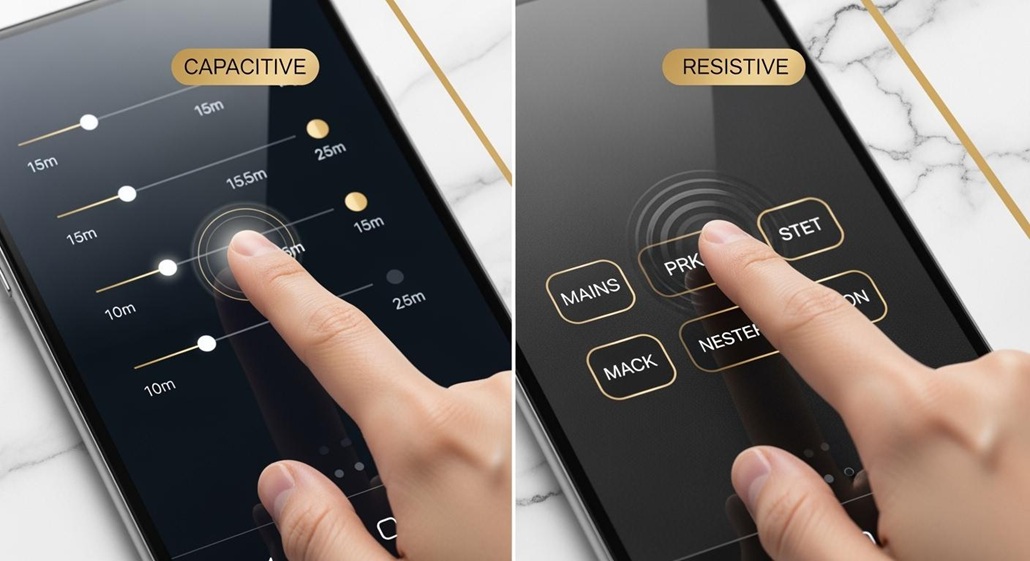
Touch responsiveness defines the modern user experience. The Golden Vision 10.1 Inch module integrates a capacitive touch panel, which detects changes in capacitance when you touch the screen. This technology enables quick and precise touch recognition, supporting multi-touch and gesture inputs for intuitive operation. You can interact with screens effortlessly, whether you are navigating menus, entering data, or controlling complex systems.

  • Capacitive touch technology processes multiple touch inputs simultaneously.

  • The rapid processing cycle ensures a responsive feel, outperforming resistive touchscreens.

  • The conductive layer, often made from Indium Tin Oxide (ITO), provides high electrical conductivity and transparency.

  • Instantaneous detection of touch leads to accurate and reliable responses.

This integration elevates the tft lcd display module, making it suitable for applications that demand both speed and accuracy.


Durability and Customization

You need displays that withstand daily use and adapt to specific requirements. The Golden Vision module features robust construction, including a strengthened cover glass and a flexible printed circuit. While many outdoor tft lcd modules offer IP65 or higher ratings for dust and water resistance, the Golden Vision display focuses on reliability and longevity in diverse environments.


Manufacturers benefit from extensive customization options. You can select between capacitive or resistive touch panels, adjust backlight brightness, and tailor the interface (such as HDMI) to your project’s needs. Customization allows you to match the display’s size, shape, and features to your application, ensuring optimal performance and a unique user experience.


Customization in tft lcd modules enables you to:

  • Achieve unique display dimensions and specialized interfaces.

  • Integrate brand elements and optimize user interfaces.

  • Enhance visual performance and reliability for niche markets.

By choosing a tft lcd display module with these advanced features, you ensure that your devices deliver consistent quality, high brightness, and exceptional usability.


Benefits of TFT LCD Technology

Enhanced Visual Experience

You want every interaction with your device to feel immersive and precise. Advanced tft lcd technology delivers this by improving color accuracy, brightness, and clarity. When you use a tft display, you notice richer colors and sharper images. Technologies like IPS and Quantum Dot expand the color gamut, so you see visuals that look true to life. High refresh rates, such as 120Hz or 144Hz, make fast-moving content smooth and enjoyable, especially in gaming or video playback.


Professional applications like graphic design and medical imaging rely on enhanced color accuracy. You can trust tft lcd displays to provide consistent and precise color reproduction, which is essential for critical tasks.

The table below highlights measurable improvements you experience with advanced tft lcd display module technology:

Improvement Type

Description

Color Reproduction

Wide Color Gamut and Quantum Dot deliver richer, more accurate colors.

High Refresh Rates

120Hz, 144Hz, and 240Hz support smooth motion for gaming and video.

Reduced Motion Blur

Fast response times minimize ghosting and blur.

Low Power Consumption

Adaptive brightness control increases energy efficiency.

Improved Viewing Angles

IPS and Super PLS maintain color and contrast from any angle.

You benefit from a tft lcd touch screen that brings out the best in every image, whether you view photos, watch videos, or analyze data.


Reliable Performance

You depend on your devices to work reliably in any environment. High-quality tft lcd modules offer robust construction and long operational life. The mean time between failures (MTBF) for commercial tft display modules typically ranges from 30,000 to 70,000 hours, which means you can expect years of continuous use with minimal downtime. This reliability reduces maintenance costs and ensures consistent performance.


Tft lcd displays maintain their quality even under extreme temperature and humidity conditions. You can use these screens in environments ranging from -30°C to 80°C, and they withstand high humidity for extended periods. Manufacturers use high-quality materials and conduct rigorous environmental testing to guarantee durability.

Feature

Specification

Operating Temperature Range

-30°C to 80°C

Humidity Resistance

85°C / 85% RH for 1000 hours

Liquid Crystal Viscosity

Maintains performance at low temps

High Temp Performance

No warping or optical damage


RoHS-compliant tft lcd display modules protect the environment by restricting hazardous substances. You support sustainability and safety when you choose RoHS-certified displays.

  • Manufacturers use recycled materials to reduce carbon footprints.

  • Bio-based polymers from renewable sources are becoming more common.

  • RoHS compliance minimizes ecological impact and promotes safer recycling.

You gain peace of mind knowing your devices meet high standards for reliability and environmental responsibility.


Power Efficiency

You want your devices to last longer between charges. Tft lcd technology incorporates energy-saving features that help you achieve this goal. Adaptive brightness control and efficient backlighting reduce power consumption without sacrificing high brightness or image quality. Compared to older display types, modern tft lcd screens balance performance and energy use.


The table below compares power consumption characteristics:

Display Technology

Power Consumption Characteristics

LCD

Very low power consumption, dependent on ambient light or backlight.

TFT

Requires more light than monochrome displays, but offers efficient operation.

OLED

Power consumption varies with content; can be higher than tft for most uses.

You benefit from longer battery life and lower energy costs, making tft lcd display technology a smart choice for portable and stationary devices.

When you select a tft lcd display, you invest in a solution that combines visual excellence, reliable performance, and energy efficiency. This enhances your user experience and supports sustainable technology.


High-Quality TFT LCD Displays in Real-World Applications

TFT LCD Display Module


Medical Devices and Healthcare

You rely on high-quality tft lcd displays in medical environments for clear, reliable information. Devices such as infusion pumps, ventilators, and AEDs use tft display modules to present patient data and system status with sharp and vibrant visuals. Touch screens simplify the user interface, reducing the need for multiple buttons and dials. This design saves space and makes equipment more efficient in patient rooms. You can check vitals and adjust settings quickly, which improves workflow and safety.


Application Type

Description

Standard Equipment

Used in monitors for general medical purposes.

Life Support Equipment

Includes devices like blood glucose meters for critical monitoring.

Life-Critical Equipment

Essential for devices such as ventilators, which demand high standards for reliability.

Tft lcd screens play a crucial role in medical imaging devices, including X-rays and MRI machines. The high resolution and superior brightness of these displays enable medical professionals to detect even the smallest anomalies, supporting accurate diagnosis.


Consumer Electronics

You interact with tft lcd display modules every day in devices like smartphones, tablets, and smartwatches. These screens deliver fast response times and excellent color performance, which enhance user interaction and satisfaction. Capacitive touch integration allows you to navigate menus and apps with ease, creating enhanced user experiences.


Product Type

Reason for Use

Computers and laptops

Superior image quality and fast response times

Televisions

Excellent color reproduction and energy efficiency

Mobile phones

Critical for user experience and display quality

Tablets

Slim form factor and energy-efficient performance

Video game consoles

Usability and product appeal

GPS devices

Clear navigation and user interaction

Tft lcd modules provide high brightness and sharp and vibrant visuals, making images and text easy to read. You benefit from displays that combine display size and resolution with energy efficiency, resulting in longer battery life and better overall performance.


Industrial and Automotive Uses

You depend on high-quality tft lcd displays for visibility and control in industrial and automotive settings. Automotive dashboards and industrial control panels require tft display modules with high brightness, wide viewing angles, and anti-glare coatings. These features ensure information remains readable under direct sunlight and in demanding environments.

Feature

Description

High Brightness

Readability under direct sunlight

Wide Viewing Angles

Uniform color and brightness across all angles

Durability

50,000+ hours of operation for longevity

Customizable Layouts

Digital clusters display speed, alerts, and more

Integration of Functions

Touchscreens combine navigation, multimedia, and connectivity


Tft lcd modules withstand vibration and shock, thanks to reinforced frames and shock-absorbing structures. You experience reliable performance and visual performance in tire pressure monitoring systems, charging stations, and coffee machines. These displays offer enhanced image quality and durability, making them ideal for demanding applications.


You see the impact of tft lcd display technology in every sector, from healthcare to consumer electronics and industrial controls. The combination of high brightness, display size and resolution, and robust construction ensures you get the best possible experience.


You experience the difference when you choose a thin-film transistor liquid crystal display for your devices. High-quality solutions deliver awesome picture quality, fast response, and long-term reliability. With an active matrix display, you enjoy stable images, wide viewing angles, and energy efficiency. As tft technology evolves, you gain access to flexible designs and advanced touch integration. Consider these features to ensure your next device meets the highest standards of quality and user satisfaction.

  • High resolution and customization options

  • Consistent performance across industries

  • Future-ready innovations for immersive experiences

Select displays that elevate your daily interactions and support your needs.


FAQ

What makes a tft lcd touch screen ideal for modern devices?

You experience fast response and precise control with a tft lcd touch screen. This technology supports multi-touch gestures, which improves navigation and interaction. You benefit from clear visuals and reliable performance in both consumer electronics and professional equipment.


How do custom lcd screens enhance device design?

You can tailor custom lcd screens to fit unique shapes, sizes, and interface needs. This flexibility allows you to create devices that stand out in the market. You achieve optimal integration and improved user satisfaction with displays designed for your specific application.


Are custom lcd screens suitable for industrial environments?

You gain durability and reliability with custom lcd screens in industrial settings. These displays withstand vibration, temperature changes, and continuous use. You ensure consistent performance and clear visibility, even in demanding conditions.


What connectivity options do modern display modules offer?

You find HDMI, LVDS, and MIPI interfaces in today’s display modules. These options provide seamless integration with various processors and controllers. You can select the best interface for your project’s requirements.


How do you maintain display quality over time?

You should clean screens with a soft, lint-free cloth and avoid harsh chemicals. You protect the display from direct sunlight and extreme temperatures. Regular maintenance ensures long-lasting clarity and performance.

Choosing the right TFT Display Module means you need to know what you need. You should try not to make common mistakes. Some people forget about things like viewing angle or temperature range. This can cause problems when you use the display. Here are some mistakes people often make:

Common Mistake

Impact

Ignoring Viewing Angle

You cannot see well from different spots

Not Considering Temperature Range

The display may break in very hot or cold places

Overlooking Power Consumption

The battery runs out fast in devices you carry

You can pick the best display by thinking about your project’s needs. Follow a simple plan to help you choose.


Key Takeaways

  • Think about what your project needs before picking a TFT display. Look at things like how people will use it and where it will be used.

  • Look at important features like size, resolution, brightness, and viewing angle. These things change how well the display works for you.

  • Try out display modules in real-life situations. This makes sure they work well where you need them.

  • Check the guides and help from suppliers. Good information helps you learn about the display and makes sure it is good quality.

  • Compare price and how well it works. Pick a display that does what you need and does not cost too much.


Define Your Application Needs

8.0 Inch TFT LCD Display Module

Before you pick a tft display, you should know what your project needs. This helps you not make mistakes. It also makes sure the module works for your project. You need to think about how people will use the display. You should also think about where it will be used. You must know what limits your project has.


Intended Use and User Interaction

Think about how people will use your tft display. Will they touch the screen or just look at it? If many people need to see the display, you want a wide viewing angle. IPS technology is good for this. It keeps colors bright from different sides. If you need touch, you must pick resistive or capacitive. Resistive screens work with gloves. They are good for rough places. Capacitive screens feel smooth and react fast to fingers.

Here is a table to help you match user needs with the right display features:

User Scenario

Best Display Type

Reason

Multiple users viewing

IPS panel

Wide viewing angles

Bright environments

High brightness display

Easy to read in sunlight

Dim environments

High contrast display

Better visibility in low light

Rugged use

Durable, touch-enabled

Withstands tough conditions


Environmental Factors

You need to check where the tft display will go. Some things to think about are temperature, humidity, and sunlight. Hot weather can make the screen slow or change colors. Cold weather can make the display less bright. Humidity can cause water inside. This can hurt the module. If your project is outside, pick a display that can handle sun and dust.

  • Hot weather can make the screen slow or change colors.

  • Cold weather can make the display less bright.

  • Humidity can cause water inside and short circuits.

  • UV light can hurt the screen over time.


Project Constraints

Every project has limits. You need to think about size, cost, power, and how easy it is to use the tft display. If your device uses batteries, pick a module that does not use much power. If you have little space, pick a display that fits. Cost is important too. Some connection types and frame sizes cost more money. Make a list of your project’s needs before you shop.

Tip: Write down your needs and limits. This helps you compare tft displays and find the best one for your project.


Key Features of TFT Display Modules

1.6 Inch TFT LCD Display Module

When you choose a tft display module, you need to know the main features. Each feature affects how well the tft lcd panel works in your project. You should look at the specifications for each tft lcd display module to make sure it fits your needs. Here are the most important features to check:


Size and Aspect Ratio

The size of a tft lcd display module decides how much information you can show. Small sizes work well for wearables or handheld devices. Large sizes fit kiosks, dashboards, or TVs. You can find tft lcd panels in many sizes, from tiny 1-inch screens to big 65-inch displays for outdoor ads.

Size

Resolution

Aspect Ratio

6.4”

1024 x 768 (XGA)

4:3

10.4”

1024 x 768 (XGA)

4:3

12.1”

1024 x 768 (XGA)

4:3

7.0”

1280 x 800 (WXGA)

16:10

8.0”

1280 x 800 (WXGA)

16:10

10.6”

1280 x 800 (WXGA)

16:10

12.1”

1280 x 800 (WXGA)

16:10

10.3”

1920 x 720 (HD)

N/A

12.3”

1920 x 720 (HD)

N/A

15.0”

1920 x 720 (HD)

N/A

You also need to pick the right aspect ratio. The aspect ratio is the shape of the tft lcd display. It affects how pictures and videos look. Here is a quick guide:

Aspect Ratio

Application Description

16:9

Good for videos and modern apps

4:3

Used in old medical and control devices

1:1 / Square

Best for dashboards and wearables

Custom Ultrawide

Used in cars and signs

Tip: Choose the size and aspect ratio that match your application. A square tft lcd panel works well for a smartwatch. A wide tft lcd display module fits a car dashboard.


Resolution and Clarity

Resolution means how many pixels the tft lcd display module has. More pixels give you sharper images and clearer text. You should match the resolution to your application. For example, a medical device needs high resolution to show details. A simple control panel can use lower resolution.

Display Size

Resolution

2.4 inch

240x320

2.8 inch

480x480

3.0 inch

432x432

3.4 inch

800x800

4.3 inch

720x672

6.2 inch

1024x600

12.3 inch

1920x720

Tft lcd display modules with high resolution give you better clarity. This is important for both industrial and consumer uses. In factories, you need to see small details. At home, you want bright colors and sharp images. Tft technology lets each pixel work alone, so you get better contrast and sharpness.


Brightness and Contrast

Brightness shows how much light the tft lcd display module gives off. You measure brightness in nits. If you use the display outside, you need high brightness. For indoor use, you can pick lower brightness.

Module Size

Brightness Range (nits)

Application Areas

12.1 inch

800 to 1500

Outdoor signs, EV chargers, kiosks, fuel pumps

Brightness Range (nits)

Application Areas

1000 to 2500

Sunlight readable displays for outdoor use

Contrast ratio is the difference between the darkest black and the brightest white. A higher brightness and contrast ratio makes the tft lcd panel easier to read in sunlight. For outdoor use, look for a tft lcd display with a contrast ratio of 1000:1 or more. Remember, glare can lower the real contrast you see, so check the display in real conditions.

  • Higher contrast ratios help you see the screen in bright places.

  • Effective contrast is more important than just the number in the specifications.


Viewing Angle

Viewing angle tells you how far you can move to the side and still see the tft lcd display clearly. If you use a tft lcd panel in a place where many people look at it, you need a wide viewing angle. IPS tft lcd display modules give you the best viewing angles.

Technology

Standard Viewing Angle

Performance Characteristics

TN

~90°

Low contrast, color shift

TN+Film

Up to 140°

Better angle, still low contrast

IPS

>170°

Wide angle, true colors

Wide viewing angles keep colors and contrast the same from all sides. This is important for medical devices, cars, and consumer electronics. You do not want the image to fade or change color when you move.


Temperature Tolerance

Temperature tolerance shows how hot or cold the tft lcd display module can get and still work. Industrial tft lcd panels can handle tough conditions. If you use the display outside, you need a wide temperature range.


Min

Max

Industrial standard

-20°C

70°C

Hi-Tni

-40°C

110°C (surface)

Some tft lcd display modules work from -30°C to +85°C. This helps in outdoor kiosks or machines in cold or hot places. Wide-temperature tft lcd panels keep working even in extreme weather. Long exposure to heat can still lower performance and life, so pick the right module for your climate.


Interface Options

The interface is how your tft lcd display module connects to your system. You need to pick an interface that matches your hardware and software. Here are the most common options:

  • MCU (MPU)

  • SPI

  • TTL (RGB)

  • LVDS

  • DSI (MIPI)

  • EDP

Each interface has its own benefits:

Interface Type

Performance Impact

Integration Complexity

Power Consumption

High-bandwidth (MIPI DSI, LVDS, HDMI)

Smooth video, high resolution

Needs careful design

May use more power

Easier interfaces (SPI, MCU)

Lower frame rates, less detail

Easy to use

Good for simple displays

RGB

Good for graphics

Medium difficulty

Balanced power use

You should check the specifications for your tft lcd display module to make sure the interface fits your project. High-bandwidth interfaces give you better display performance but may need more power and careful design.

Note: Always match the interface of your tft lcd display to your system for the best performance and easy setup.

By understanding these key features, you can pick the right tft lcd display module for your project. Look at the specifications for size, resolution, brightness and contrast ratio, viewing angle, temperature, and interface. This helps you get the best display performance for your needs.


How to Compare TFT LCD Display Modules

Research and Shortlist

Begin by writing down what your project needs. Look at things like size, resolution, aspect ratio, brightness, viewing angle, contrast ratio, temperature range, power use, interface options, and touch screen type. Make a list of tft display modules that match these needs. Use charts from suppliers to see differences fast. This helps you find modules that work best with your system.

  • Size

  • Resolution

  • Brightness

  • Viewing angle

  • Touch screen type

  • Power use

  • Interface options

Tip: Always make sure the display fits your device and works with your system.


Match Specs to Needs

Next, check each tft display module’s features against your project needs. Use a table to compare what matters most. Resolution makes images and text clear. Environmental factors show if the display works in tough places. Some projects need touch screens that work with gloves or waterproof displays for outside. Make sure the module matches your hardware and software.

Specification

Relevance to Project Requirements

Resolution

Shows how clear and detailed the display is.

Environmental Factors

Makes sure the panel works in special conditions.

Customization Options

Lets you change the panel for your project’s needs.


Test and Validate

Test the tft display modules before you decide. Ask suppliers for samples if you can. Try the display in your own space. Test how it starts in cold, works in heat, and responds to touch. Check if it lasts and stays strong when used a lot. Testing early helps you avoid problems and makes sure the module fits your system.

Best Practice

Description

Early Validation and Thermal Testing

Try display modules early in real conditions, like cold starts and hot weather.

Mechanical and Optical Integration

Think about heat, sealing, and airflow; work with makers to lower risks.

Avoiding Over-Specification

Know where you will use the display so you do not spend too much or make things too hard.


Review Documentation and Support

Look at the maker’s instructions and help before you buy. Good instructions help you learn about the display’s features and how it works with your system. Helpful support can fix problems and make the display last longer. Pick suppliers who give good records and promise quality. This makes sure you get help when you need it and your display works well.

Aspect

Importance

Technical Support

Helps you set up the display and fix problems for your needs.

Comprehensive Documentation

Helps you know what the product can do and makes sure it works well.

Quality Assurance

Regular checks and records help make the display better over time.

Steps like testing, reading instructions, and checking if the display fits your system help you pick the best tft display for your project.


You can pick the right TFT display module by using three steps. First, think about what you need and how you will use it. Then, look at important things like if it connects to your system, how strong it is, and how much it costs. The table below shows what you should remember:

Key Consideration

Description

Interface Compatibility

Make sure the display works with your system.

Durability

Pick a display that lasts in tough places.

Application-Based Selection

Choose features for your environment and content.

Cost vs. Performance

Balance price and quality for the best value.

Visibility Features

Look for optimal visibility and sunlight readability.

Always check datasheets for the latest details. Talk to experts if you need help. This helps you get clear images and a display that fits your project.

  • Look at product specifications for correct information.

  • Ask experts for help with special needs.


FAQ

What is a tft display module?

A tft display module uses thin-film transistor technology to show images and text. You get clear pictures and fast response times. You often see these modules in devices like tablets, car dashboards, and industrial machines.

How do I choose the right display size?

You should pick a display size that fits your device and shows all needed information. Small screens work well for wearables. Larger screens help with kiosks or dashboards. Always check your project’s space and user needs.

Why does brightness matter for a display?

Brightness helps you see the display in different lighting. If you use your device outside, you need a brighter display. Indoor displays can use lower brightness. Always match the brightness to your environment for the best results.

What makes an ideal tft lcd panel for outdoor use?

You need a panel with high brightness, wide temperature range, and strong durability. This helps the display stay clear and last longer in sunlight, rain, or dust. Always check the specifications for outdoor use.

Can I use a tft display in cold or hot places?

Yes, you can use a tft display in many environments. You must check the temperature range in the product details. Some displays work in extreme cold or heat. Always test the display in your real conditions.


You can make your device use less power by picking the right Monochrome LCD Display and using smart ways to run it. Golden Vision's monochrome LCD display modules need less energy than color screens. This helps your battery last longer. If you choose the best display and use good driving methods, you use less energy but still get good display performance. Many people like monochrome screens because they are easier to read in sunlight and help support green technology.


Power Efficiency in Monochrome LCD Display Integration

Battery Life Impact

You want your device to last longer on one charge. Saving power is important for low power devices. Picking a monochrome lcd display helps your device use less energy. Monochrome screens are good for saving power because they use reflective modes. This lets the display use light around it instead of a backlight. Using ambient light saves energy. These displays also work with lower voltage, so your battery lasts longer. If your device shows the same image for a while, a monochrome lcd display uses very little power. You can change the refresh rate to save even more energy. These choices help your battery last longer and make your device more dependable.


Here is a table that shows how monochrome lcd displays help save power:

Feature

Description

Reflective Modes

Uses light from the area, so it needs less or no backlight

Voltage Operation

Works with lower voltage, great for devices with batteries

Static Content Efficiency

Uses little energy when showing the same picture

Ambient Light Modulation

Changes light from around it, does not make its own light

Battery Life Extension

Lower refresh rates use less energy and make batteries last longer


User Experience Benefits

You want your device to be simple to use and easy to read. Monochrome lcd displays are clear, even in bright sunlight. This makes it easy for people to see information without hurting their eyes. Using less power means your device stays on longer, so people do not need to charge it often. When you save power, your device stays cool and safe. People have a better time using your device because the display works well in many kinds of light. You can make devices that are reliable and good for the environment. Using monochrome displays in the right way helps save power and makes your product special.

Tip: If you pick a monochrome lcd display, you can save power and keep the screen easy to see. This helps you make devices that last longer and work well for everyone.


Selecting the Right Monochrome LCD Display

Reflective, Transflective, or Backlit Types

You must pick the best lcd type for your device. Each type helps save power and makes the screen easy to see. Reflective displays use light around you. You can see the screen well outside. These displays do not need a backlight, so they save energy. Transflective displays mix reflective and backlit features. They work well in bright and dark places. Backlight monochrome LCD displays make their own light. These are good in dark spots but use more power.


Here is a table that shows how different things change how easy it is to read and how much power is used:

Factor

Impact on Readability

Impact on Power Consumption

Monochrome Displays

High contrast makes it easy to see outside

Usually uses less power

Brightness Increase

Makes the screen easier to see

Uses more battery power

Positive Mode Displays

Works great in sunlight

Saves power with two ways to show images

Touch Panels

Can make the screen less bright

Needs more power to keep brightness

Tip: If you want your device to work well outside, pick a reflective or positive mode monochrome lcd display. You save energy and get clear images.


Application-Based Selection

You should choose the display type that fits your device. Monochrome lcd screens are used in medical devices, smartwatches, and industrial sensors. Each device needs something special. Medical devices need to be easy to read and work well. Smartwatches need to save power and be easy to see. Industrial sensors need to last long and show clear images.

Application

Key Requirements

Medical Devices

Easy to read, works well, simple to use

Smartwatches

Saves power, easy to see

Industrial Sensors

Lasts long, easy to read, works well


When you pick a display, think about size and resolution. How much you want to show and the space in your device matter. If you only show simple things, use a small screen. If you show lots of words or pictures, use a bigger screen.

  • Think about the size and resolution for your device.

  • Small, clear screens are good for things you hold.

  • Big control panels need wide screens.

The resolution should match what you show. Simple screens do not need lots of pixels. If you show menus or lots of data, more pixels help people see better.

Note: Picking the right monochrome display for your device helps you save power and gives users a good experience. You get the best results when you focus on what your device needs.


Low Power Consumption Driving Techniques

You can help your device use less energy by using smart ways to run your high contrast monochrome LCD display. These methods help you save power and make your device last longer. You get better battery life when you use the right techniques.


Refresh Rate and Duty Cycle Optimization

You can change the refresh rate to fit what your device shows. If your screen does not change much, you can lower the refresh rate. This helps save energy and makes your battery last longer. You can also change the duty cycle. The duty cycle is how long the display stays on each time. If you make the duty cycle lower, you use less power. You keep the screen easy to read and save energy too.


Here is a table that shows some ways to run your display and what they do:

Technique

Description

Benefits

Adaptive Refresh Rates

Change refresh rates for different pictures.

Saves power when showing the same image.

Power-Saving Modes

Built-in settings that help use less power.

Makes batteries last longer and keeps features.

Low-Power Display Drivers

Use special parts to use less power.

Good signal control and saves energy.


Tip: Lowering refresh rate and duty cycle helps you save energy and keep your display looking good.


Drive Voltage Adjustment

You can lower the drive voltage to help your device use less power. Most monochrome lcd displays work well at 5 volts. You can use 3.3 volts to save even more energy. You should check the display when you lower the voltage. Sometimes, the screen looks dim if the voltage is too low. You need to find the best spot between saving energy and having a clear screen.


Here is a table that shows how drive voltage changes power use and display quality:

Drive Voltage (V)

Power Consumption Reduction (%)

Display Quality Impact

5

0

Best

3.3

~44

Might look dim


Note: Test your lcd at different voltages. Pick the lowest voltage that still looks bright and clear.


Low Power LCD Controllers

You can pick a low power lcd controller to help your device use less energy. These controllers help you save power and make your device work better. Some controllers are easy to see in sunlight and have good resolution. You can find controllers that fit your device and your budget.


Here is a table with some popular low-power lcd controllers:

Part Number

Diagonal Dimension

Colors

Sunlight Readable

Resolution

Price Range

CFAG12864T3-NFH

1.15"

Dark on Light Gray

Yes

128x64

$5.37 - $7.68

CFAG12864U3-NFH

2.23"

Dark on Light Gray

Yes

128x64

$8.39 - $12.02

CFAG4265A0-TFK

1.00"

Dark on White

Yes

42x65

$4.95 - $5.69


Tip: Choose a controller that fits your device. You get better battery life and save energy with the right controller.

You can use these smart ways to help your device work better. You save energy, make your battery last longer, and keep your monochrome lcd display easy to read. Good power management helps you build devices that last and use less energy.


Backlight Optimization Strategies


Dimming and Adaptive Control

You can save power by using smart backlight methods. Dimming lets you make your lcd less bright when you do not need it. This helps you use less energy and makes your device last longer. Adaptive control changes the backlight based on what is on the screen. Content Adaptive Backlight Control (CABC) sets the brightness for each image or text. If your monochrome lcd display shows a simple picture, CABC makes the light lower. When you need to see more details, it makes the screen brighter. This technology can save you 20-40% energy. You get better efficiency and your device uses less battery. You do not waste power by keeping the screen too bright.

Here are some ways adaptive control helps you:

  • Changes brightness for different things on the screen

  • Saves battery by lowering light you do not need

  • Keeps the screen easy to read in many places

Tip: Try adaptive backlight control to help your device work better. You use less lcd power and your device stays reliable.


Screen-Off and Power Saving Modes

You can save more energy by turning off the screen when you are not using it. Many devices have power saving modes that shut off the backlight after a short time. You can set a timer so the lcd turns off when not used. This helps you reach your low power goals. Sleep modes also cut power to the display. Your device wakes up fast when you need it again. These ideas help you get the best battery life.

Strategy

How It Works

Benefit

Auto Screen-Off

Turns off display after idle time

Saves energy

Sleep Mode

Cuts power to lcd when not in use

Extends battery life

Quick Wake-Up

Restores display fast

Improves user experience


Note: Use screen-off and sleep modes to save more energy. Your device stays efficient and ready to use.


Integration with Microcontrollers and System Design

Hardware Connections and Command Logic

You must connect your monochrome lcd to the microcontroller carefully. Good connections help your device work well and save power. Many people use microcontrollers like STM32 for lcds. Match the display type to your system’s voltage. TN displays need more voltage. STN displays need less voltage and show better contrast. You can pick displays like Nokia 5110 for very low power. Small monochrome OLEDs are bright and fit in tight spaces.

Display Type

Voltage Requirement

Advantages

TN

Higher voltage

Basic technology

STN

Lower voltage

Better contrast, faster refresh


Set up command logic so the lcd only updates when needed. This helps save power and keeps your device working well.


Interface Choices (SPI, I2C, Parallel)

You can choose different ways to connect your lcd. SPI and I2C are good for low power devices. SPI uses more wires but sends data faster. I2C uses fewer wires and saves space on your board. Both can help save power if set up right.

Feature

I2C

SPI

Wires

2 (SCL, SDA)

4 (SCLK, MOSI, MISO, CS)

Data Speed

100 kbps – 400 kbps

Up to 10+ Mbps

Duplex Mode

Half-duplex

Full-duplex

Pin Efficiency

High

Moderate


Use I2C for simple screens. Use SPI for faster updates. Parallel interfaces use more pins and more power, so try not to use them.


Power Supply and Sleep Modes

You need a good power supply to keep your lcd working with little energy. Supercapacitors store energy and help your device run on low power. If voltage drops, your system can go into deep sleep mode. This saves power when the device is not being used. Even when working, you can reach very low current, like 11.4 micro-amps.

  • Supercapacitors store energy for quick use.

  • Deep sleep mode saves power when the device is idle.

  • Low current use keeps your device efficient.


Pick microcontrollers with low-power designs for better efficiency. These are best for portable devices. High-performance designs give more speed but use more energy.

Architecture Type

Power Efficiency Impact

Use Case

Low-Power Architectures

Save energy, great for battery-powered devices

Good for portable devices with less speed

High-Performance Architectures

Fast processing and many features

Best for displays with lots of graphics, but use more power


Tip: Use sleep modes and smart power supply design to help your monochrome lcd device last longer. You get better power management and save energy.


Environmental Factors and Display Optimization

Temperature and Ambient Light Effects

You should think about how heat and light affect your monochrome LCD display. Hot weather can make the screen less bright. It can also cause dead pixels. Your device might use more power and get warmer. Cold weather can make the display flicker. It may also start up slowly. These problems make your device hard to use in very hot or cold places.


Here is a table that shows how temperature changes your display:

Environmental Factor

Impact on Performance

Impact on Power Consumption

High Temperature

Screen gets dim, dead pixels appear

Uses more power, gets hotter

Low Temperature

Flickers, slow to start

N/A


Light around your device also matters. Bright sunlight helps reflective displays work well. You do not need a backlight, so you save energy. In dark places, you need a backlight to see the screen. This uses more power.

Tip: Put your device where there is enough light. This helps your display stay clear and saves power.


Balancing Visibility and Power Use

You want your device to look good and not waste energy. You can change display settings to get the best results. Positive mode displays show dark letters on a light background. These are easy to read in bright light. They use less power because they use light around them. Negative mode displays show bright letters on a dark background. These need a backlight and use more energy.


Here is a table that compares display modes:

Display Mode

Characteristics

Power Consumption Impact

Positive Mode

Light background, dark letters, easy to read

Uses less power, uses light around it

Negative Mode

Dark background, bright letters, high contrast

Uses more power, needs backlight

You can use these tips to save energy:

  • Use sleep or standby modes when you do not need the display.

  • Dim or turn off the backlight in bright places.

  • Pick a transflective display to use light around you.

Lowering the refresh rate helps too. The display updates less often, so it uses less power. This works best when you show the same picture for a long time.

You can balance how easy the screen is to see and how much power it uses. Pick the right display mode and change settings for your environment. Your monochrome LCD display will stay clear and use less energy.


You can make low-power devices work better by using these ideas. Pick a monochrome display that fits what you need. Try smart ways to run your display and set up your device to save energy.

  • Choose displays that are right for your device

  • Change how often the screen updates and lower voltage

  • Turn on sleep modes and use backlight that changes

Keep learning about how to use displays. You will build devices that last longer and work well almost anywhere.


FAQ

What is the best way to reduce power use in a monochrome LCD display?

You can make the refresh rate lower. Use reflective or transflective displays. These choices help you save energy. You can also dim the backlight. Turn off the backlight when you do not need it.


Can you use monochrome LCDs outdoors?

Yes, you can use them outside. Reflective monochrome LCDs work well in sunlight. The display uses light from around you. You see clear images without needing a backlight.


How do you connect a monochrome LCD to a microcontroller?

You can use SPI or I2C to connect. SPI sends data faster. I2C needs fewer wires. Both ways help you save power and space on your board.


Do temperature changes affect monochrome LCD displays?

Yes, temperature changes can affect your display. Hot weather can make the screen dim. Cold weather can cause slow starts or flicker. You should test your device in different temperatures.


What is the difference between positive and negative mode displays?

Mode

How It Looks

Power Use

Positive Mode

Dark letters on light background

Lower

Negative Mode

Light letters on dark background

Higher


Tip: Pick positive mode for saving power and easy reading in bright light.

During the surge of cabinet integration in smart manufacturing, the footprint of connectors has become a key bottleneck limiting equipment compactness. Traditional latch‑style housings require extra clearance for unlatching, restricting how densely wiring can be arranged. WAIN’s quick‑connect W3A metal housing uses a spring‑assisted latch and a zero‑protrusion unlocking design to compress the installation space and provide the hardware support needed for high‑density deployment of industrial equipment.


Comparison with traditional latch type housings


No.1

Space usage

The traditional design takes up more room and needs extra space for the latch to open; the W3A is more compact and the built‑in button means no additional clearance is needed when unlocking.

No.2

Sealing

Axial compression sealing on the traditional design offers good protection; the W3A’s lateral radial sealing provides even better protection.

No.3

Ease of use

With the traditional design you must open the latch before you can plug or unplug; with the W3A you simply press the button and push or pull in one step.


Advantages of the W3A quick connect housing


No.1

Improved plug/unplug efficiency

✔️ The button integrates both mating and unlatching functions, so plugging or unplugging is a single press‑push/pull action instead of the multi‑step process required by traditional locks.

No.2

Secure and reliable connection

✔️ A limit‑rib design ensures precise insertion and provides mechanical locking force to prevent accidental disconnection, keeping the connection solid.

No.3

Seamless upgrade compatibility

✔️ The panel cut‑out dimensions are identical to those of the existing (latch‑type) 3A housing, so existing panels can be upgraded smoothly to the W3A without modification.

No.4

Comprehensive protection

✔️ Rated IP67, it resists dust and short‑term water immersion;

✔️ Its optimized lateral radial sealing structure delivers excellent sealing and reliable protection.

No.5

Compact, efficient design

✔️ Its very small size and quick‑connect feature make it ideal for dense installation environments such as telecommunications cabinets, control boxes and smart devices.


·END·

WAIN is not only manufacturing, but also creating!

Any questions and ideas related to industrial connectors,

we welcome to discuss with you.


In today's fast-paced logistics and supply chain environment, accuracy, speed, and real-time visibility are not just advantages—they are essential. Manual data entry and barcode scanning are increasingly becoming operational bottlenecks. This is where Automatic Identification and Data Capture (AIDC) technologies, particularly Radio-Frequency Identification (RFID), demonstrate their critical value. Integrating these powerful devices with your core Warehouse Management System (WMS) or Enterprise Resource Planning (ERP) system can fundamentally transform your operations.


This guide provides a structured, step-by-step methodology to ensure a successful integration.

Step 1: Define Your Objectives and Scope
Before purchasing a single tag, ask yourself: What problem are we solving?
Set Clear Goals: Is the goal to reduce shipping errors by 99%? Achieve 100% real-time inventory accuracy? Or cut manual receiving labor by 50% through automation? Clearly define your Key Performance Indicators (KPIs).
Define the Process Scope: Start with a pilot. Choose a critical yet manageable process, such as high-value goods receiving, pallet tracking, or outbound verification. A focused project scope helps manage risk and clearly demonstrate Return on Investment (ROI).


Step 2: Assess Your Technology Landscape
Understand your existing resources and required technology.
Analyze Your Current WMS/ERP System: Evaluate your system's capabilities. Does it have native RFID support or APIs for integration? Can it handle high-frequency, real-time transaction data?
Select the Appropriate RFID Hardware: Choose the right tools for your environment and materials.
Tags: Select based on item material (metal, liquid), read range, and memory requirements (UHF tags are common in supply chain applications).
Readers & Antennas: Use fixed readers for dock doors, conveyors, or portals. Use handheld readers for cycle counts and mobile tasks.
Printers: For on-demand printing and encoding of tags.

Step 3: Design the Integration Architecture
This is the blueprint for your data flow.
The Middleware Layer: This is often the critical component. RFID middleware (e.g., from Zebra, Impinj, or software like RFID Edge) acts as the "translator." It is responsible for:
Filtering & Managing raw RFID read data (eliminating duplicates and "read chatter").
Converting tag IDs into meaningful business events (e.g., "Tag ID 12345 = Item XYZ received at Dock Door 1").
Formatting & Routing this cleansed data to the WMS/ERP via standardized APIs (RESTful, SOAP) or direct database updates.
Data Flow Modeling: Precisely plan the data sequence. Take the receiving process as an example:
Purchase Order in ERP -> Expected ASN in WMS -> RFID read at dock door -> Middleware validates against ASN -> WMS updates inventory quantity and location -> ERP is notified of receipt.

Step 4: Develop, Test, and Pilot
Development & Configuration: Configure the middleware rules and develop the API connections between the middleware and your WMS/ERP. Ensure business logic is correctly applied.

Lab and Field Testing: First, test in a controlled environment. Simulate different scenarios (mixed pallets, fast-moving tags). Then, conduct a live pilot within the defined scope. Measure results against the KPIs set in Step 1.

Step 5: Full Deployment and Change Management
Phased Rollout: Based on pilot success, expand the integration to other processes (picking, packing, shipping).
Training is Crucial: Staff need to understand why the process is changing, not just how. Train them to handle exceptions (e.g., an unread tag) and perform basic maintenance on new equipment.

Key Success Factors and Common Challenges

Critical Success Factors:
Executive Support: Secure necessary resources and cross-departmental collaboration.
Data Quality: The success of integration depends on the input data. Ensure tags are securely attached and correctly encoded.
Partner Selection: Work with reliable suppliers experienced in hardware, software, and integration.


Common Challenges:
Environmental Interference: Metal and liquids can affect RFID performance. Conduct a site survey and perform tag selection tests.
Resistance to Change: Address this through communication, training, and involving frontline staff in the pilot.
Data Overload: Proper middleware configuration is essential to filter irrelevant data and send only "purified" business events to the WMS/ERP.

Conclusion
Integrating RFID/AIDC devices with your WMS or ERP system is not a simple "plug-and-play" hardware upgrade. It is a strategic project that connects physical operations with digital management systems. By following this step-by-step guide—from defining business objectives to carefully managing change—you can unlock unprecedented operational visibility, accuracy, and efficiency.
The return on investment is clear: reduced errors, optimized labor, improved inventory accuracy, ultimately leading to a more agile and competitive supply chain. The time to start planning is now.

About FYJ
As a professional provider of integrated RFID hardware and software solutions, FYJ understands that every enterprise may encounter unique "bottlenecks" on its integration journey. Whether it's confusion in tag selection, challenges in system connectivity, or the need for scenario validation, we possess extensive cross-industry experience and a mature technical architecture. We can tailor an end-to-end solution for you, encompassing hardware, middleware, and system integration.

If you are planning or currently facing integration challenges, we welcome you to contact us. Our expert team will provide you with targeted consultation and offer you a 7-day full-feature free trial, allowing you to experience the tangible business impact of our technology in a real-world scenario, completely risk-free.

Take action now and embark on the first step of your intelligent upgrade!


-----------------------------------------